Screen Recordings for
Software Teams
Request screen recordings to reproduce issues instantly, or capture your own screen to share updates.
100% cloud-native. Zero installations required.
14-day free trial. Unlimited screen recordings.
Request a screen recording
Send a request link
Generate a unique screen recording link from your dashboard or directly inside your ticketing system.
User records the issue
They click the link and record their screen natively in the browser. No extensions or accounts required.
Review the screen capture
Watch the recording or read the AI-generated text summary with clickable timecodes attached right to your ticket.
Capture & Share your own screen
Record your screen
Click to start capturing your browser, terminal, or desktop. Perfect for PR reviews, feature demos, or proving that "it works on my machine".
Share the link
Send the URL to your team. They can watch the screen recording instantly in any browser.
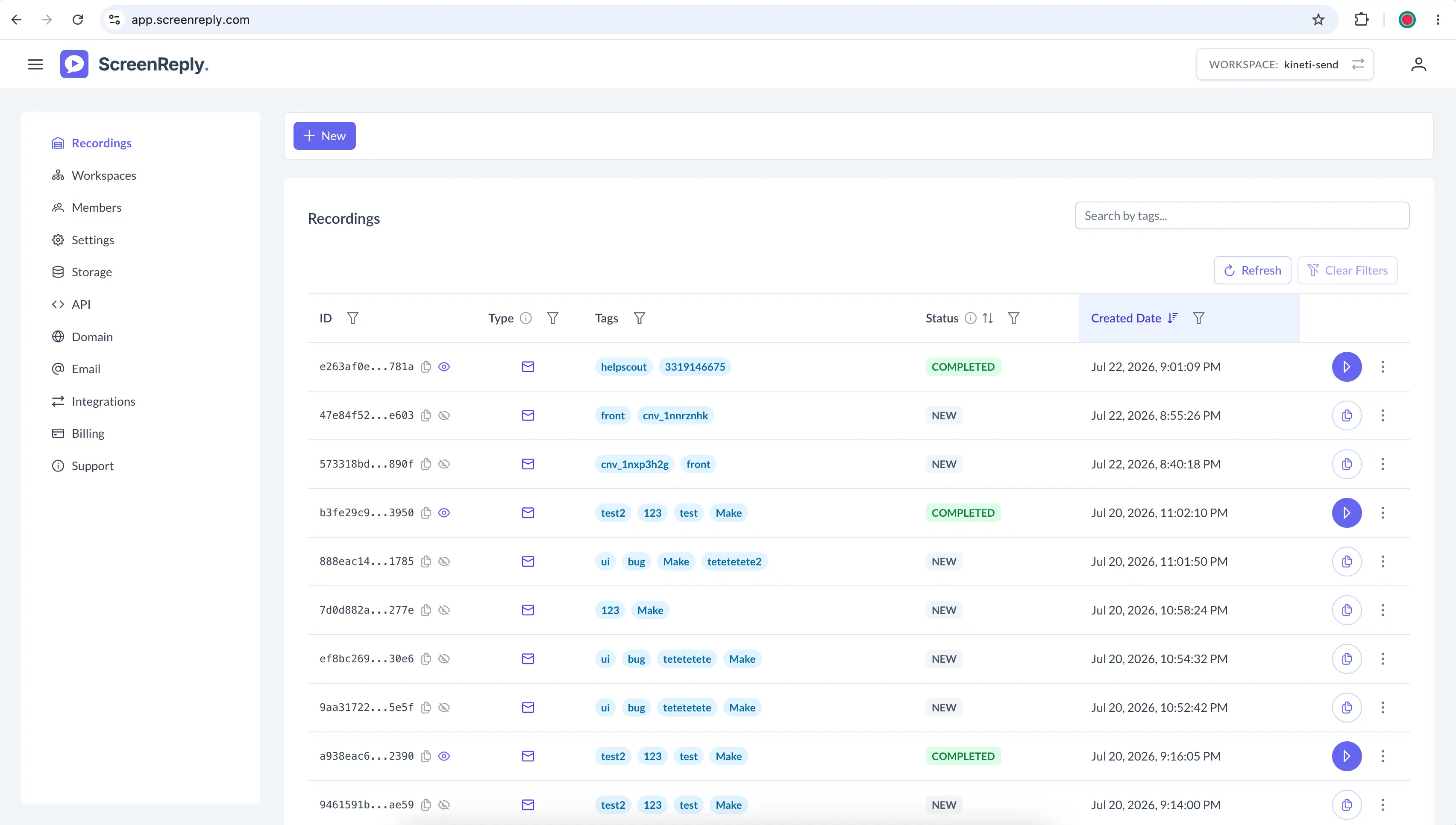
All your screen recordings in one place
Manage your team's screen recordings in a centralized dashboard. Keep everything organized by tagging captures with relevant information, like issue IDs, priority, and feature names, so you can find them instantly later.
Control Your Recording Infrastructure
Built for software teams that need private storage and API access without spending weeks on implementation.
Bring Your Own S3 Storage
Keep sensitive screen recordings on your own infrastructure. Connect your AWS, GCP, or any S3-compatible cloud bucket to maintain strict data compliance and 100% ownership of your video data.
- Connects instantly from the dashboard
- Scale recordings on your own infrastructure
-H "Authorization: Bearer YOUR_API_KEY" \
-H "Content-Type: application/json" \
-d '{
"email": "[email protected]",
"direction": "REQUEST",
"tags": ["bug-report", "jira-123"]
}'
Screen Capture API
Automate your workflows. Use our REST API to programmatically generate unique screen recording request links. Fetch MP4 files and metadata automatically to pipe screen captures directly into your issue trackers, QA systems, or custom internal tools.
- Generate dynamic recording requests
- Fetch specific metadata, tags, and status updates
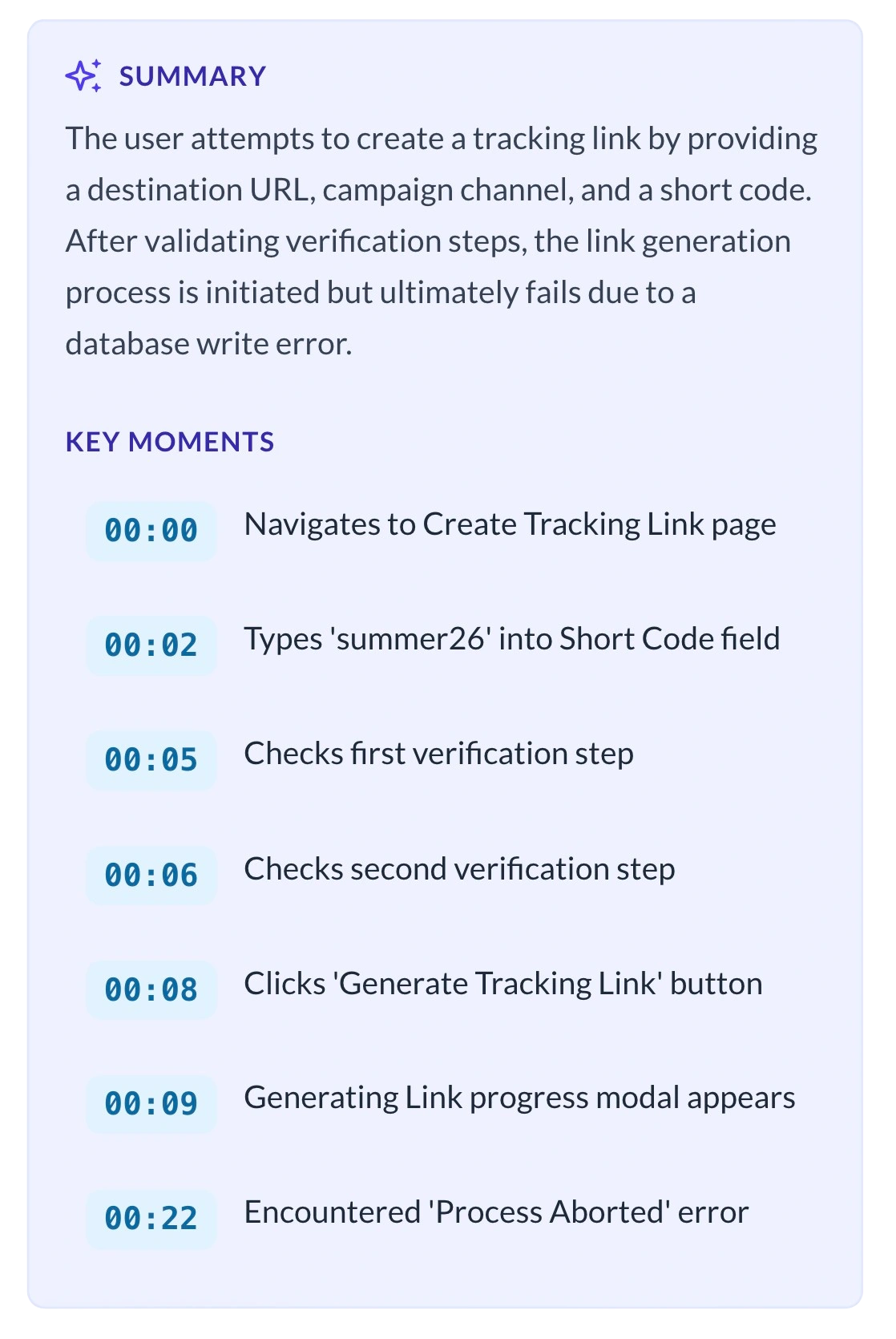
Boost Productivity with AI Summaries
ScreenReply automatically analyzes captured videos to generate precise text summaries and clickable timestamps. Quickly understand context and navigate directly to critical moments without reviewing the entire recording.
- Read the Summary: Instantly grasp the context and steps taken without having to press play.
- Jump to Key Moments: Click any generated timestamp to skip right to the critical error or UI interaction.
Stop the "Cannot Reproduce" Cycle
See the exact steps to reproduce issues and ship fixes faster.
The Old Workflow
- • Someone reports an issue with vague text or static screenshots.
- • You ask for the browser version and exact steps to reproduce.
- • Endless Slack threads trying to mimic the environment.
- • Ticket gets closed as "Cannot Reproduce".
- • The issue persists in production, frustrating users.
The ScreenReply Way
- Send a one-click screen recording request.
- See the exact cursor movements, UI states, and interactions.
- Review the auto-generated AI summary directly in the ticket.
- Record your own screen to prove the fix works across environments.
- Merge the PR and close the ticket instantly.
Frequently Asked Questions
Do users need to install any extensions to record their screen?
No installations required! ScreenReply is 100% browser-based. They just click the link and start recording natively.
Can we capture the browser's developer console or network tab?
Yes. If the user selects 'Entire Screen' or 'Window' when prompted by their browser, anything visible on their screen will be captured—including terminal windows, developer tools, and network requests.
Can I use my own AWS/GCP storage?
Absolutely. You can connect any S3-compatible cloud storage bucket. This ensures all recorded screen captures never rest on our servers and complies with your internal security policies.
Is there a time limit for PR review recordings?
On our default cloud storage, recordings are limited to 15 minutes. If you connect your own custom S3 storage, your screen recordings can be up to 30 minutes long.
Do you have an API to generate links automatically?
Yes, our REST API allows you to programmatically generate unique screen recording request links and fetch the resulting MP4 files directly into your issue trackers, QA systems, or custom tools.
Ship faster with screen recording
Equip your team with the simplest tool to record issues, document PRs, and share screen updates.
14-day free trial. Unlimited screen recordings.