Screen recording for
Managed Service Providers
Protect your margins and hit your SLAs. Record your screen to walk clients through solutions, or request one-click video recordings directly from your PSA or helpdesk.
14-day free trial. Unlimited recordings.
Why Text-Based Tickets Are Killing Your Margins
Vague descriptions from end-users lead to endless back-and-forth emails. Give your Level 1 techs the visual clarity they need to resolve tickets instantly.
Reduce Time-to-Resolution
Stop guessing what the client clicked. Seeing their exact screen allows your techs to pinpoint the issue and provide a fix on the first reply, protecting your SLAs.
Skip the Remote Session
Not every software glitch requires coordinating schedules for a remote control session. Collect async videos and resolve the ticket in the background.
Flawless Escalations
When L1 support escalates a ticket to L2 or L3, they can attach the client's screen recording. Senior engineers get clear reproduction steps without asking the client to repeat themselves.
Zero friction for your clients
Your clients don't want to install software just to show you an error. With ScreenReply, the client simply clicks your link and records directly from their browser. No extensions, no admin permissions, and no complicated sign-ins. Customize the interface with your MSP's logo to maintain a professional, white-labeled experience.
Review the video and AI summary
As soon as the client stops recording, the video is securely uploaded. Open the link directly in the ScreenReply interface to watch the high-quality playback and review AI-generated text summaries with clickable timecodes, helping you jump straight to the exact moment the issue occurs.
Why not just use your RMM tool?
RMM and remote control tools are great, but they require the device to be managed and the client to be present. ScreenReply bridges the gap for unmanaged devices and async support.
Remote Control / RMM
- • Requires coordinating a time when the client is at their desk.
- • Does not work well for BYOD, home PCs, or unmanaged devices.
- • Client often feels "watched" and has to recreate the bug live.
- • Takes up an active block of your technician's billable time.
ScreenReply
- 100% asynchronous. Client records on their time, you review on yours.
- Works on any device via a browser—no RMM agent required.
- Client demonstrates the issue exactly as they experience it.
- Frees up Level 1 techs to handle multiple tickets concurrently.
Don't watch the whole video. Just read the AI summary.
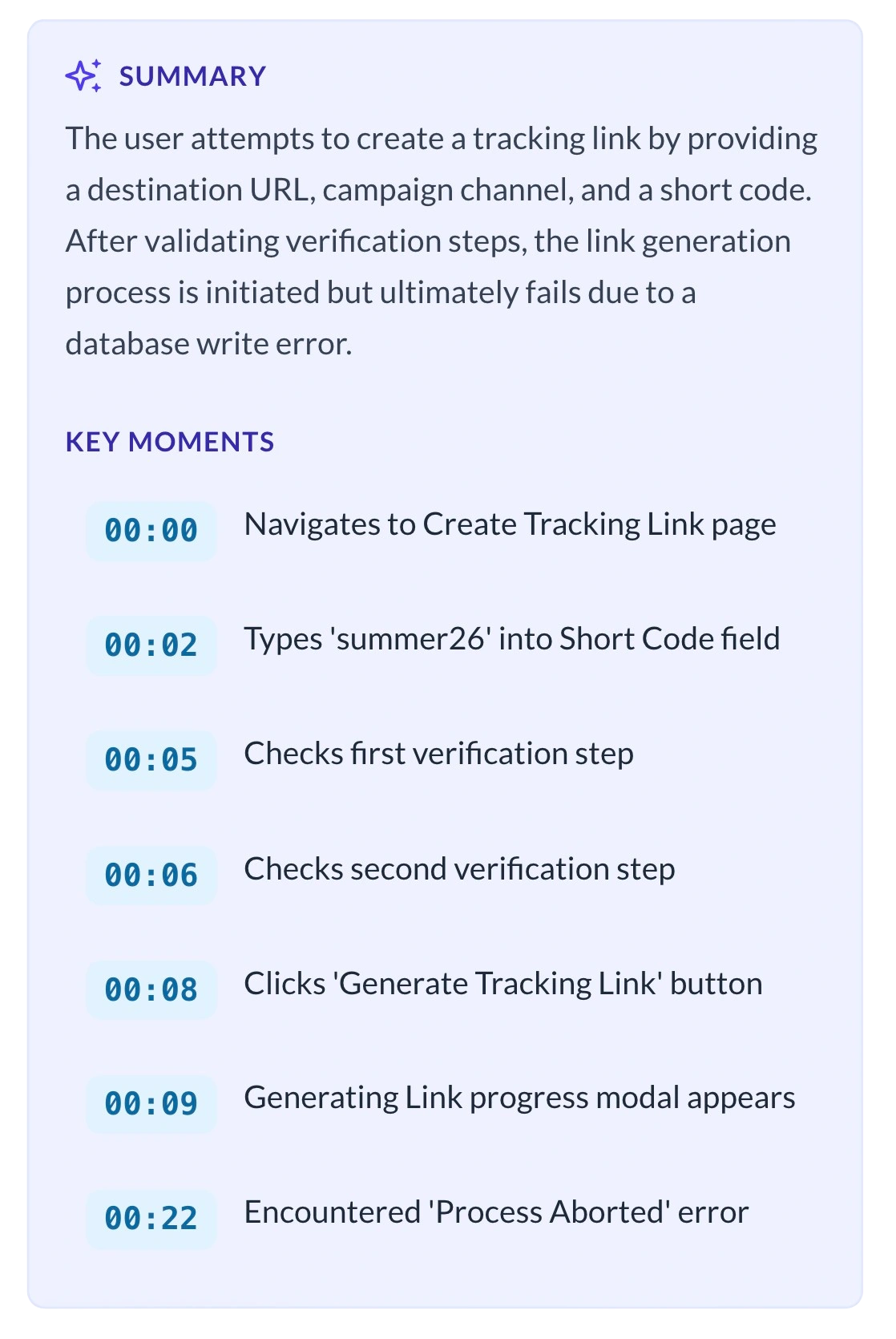
Receiving a 5-minute screen recording from a client is great for context, but terrible for your technician's time. We solved this.
- Instant Text Recaps: Inside the ScreenReply interface, our AI automatically analyzes the client's recording and generates a concise text summary of the issue or question.
- Clickable Timecodes: The AI identifies the exact moments where the client encounters an error, providing direct timestamps you can click to jump straight to that part of the video.
Total Control Over Client Data Security
MSP tickets often contain sensitive client environments, proprietary software, or credentials. Use our secure cloud hosting, or seamlessly connect your MSP's own Amazon S3-compatible storage bucket. By saving the final video files directly to your own infrastructure, you maintain complete ownership over the data, making it easier to enforce custom retention rules and align with your clients' strict privacy agreements.
Frequently Asked Questions
Why not just start a remote control session (ScreenConnect, TeamViewer)?
Remote control requires the client to be available at their desk at the same time as your technician. ScreenReply allows you to collect visual proof asynchronously. Furthermore, it's perfect for devices where you haven't deployed your RMM agent yet (BYOD, home networks, or during new client onboarding).
Can we white-label the recording interface with our MSP's branding?
Yes, absolutely. We know that as an MSP, your brand is your reputation. You can fully white-label the recording pages so your clients see your logo and your brand colors when they click the link to record their screen.
Will clients need admin rights to record their screen?
No. Often, clients on restricted corporate networks can't install tools to show you what's broken. When they click your ScreenReply link, they record directly through their browser (Chrome, Edge, Safari) utilizing native web APIs. No admin permissions or software installations are required.
Can my technicians record their own screens to send instructions to clients?
Yes! Techs can easily record themselves demonstrating how to access a VPN, configure an email client, or navigate a portal, and drop the link back into the PSA. It provides a much better customer experience than sending a text-heavy knowledge base article.
Does ScreenReply work on a client's personal home computer?
Yes, that is one of the biggest advantages. Since ScreenReply runs entirely in the browser, it works on any device that has a modern web browser. If a client is working from a personal laptop or a BYOD machine that does not have your RMM agent installed, they can still record and share their screen with you.
How does this help with SLA compliance?
By eliminating the back-and-forth of clarifying what the issue is, your technicians can resolve tickets faster. The AI-generated summaries with timestamps also help with accurate documentation, making it easier to log what was done and stay within SLA windows.
Can we store recordings on our own infrastructure for compliance?
Yes, you can connect your own S3-compatible storage bucket. When you use your own S3, recordings never touch ScreenReply's storage servers. This gives you full control over data retention, backups, and security policies, which is critical for MSPs managing clients with strict compliance requirements.
Boost your MSP's efficiency today
Stop wasting billable hours trying to decode vague client emails. See exactly what your clients see with one-click screen recordings.
14-day free trial. Unlimited recordings.