Screen Recording for
Account Managers
Record personalized onboarding videos, walk clients through reports, or request quick video feedback directly from your CRM—no apps or installations required.
14-day free trial. Unlimited recordings.
Why Email-Only Communication Hurts Client Retention
Complex product rollouts and quarterly reports get lost in long emails. Give your clients the personalized visual context they need to understand value instantly.
Accelerate Client Onboarding
Stop sending generic PDF guides. Record short, personalized walkthroughs of their new dashboard, showing exactly how they can achieve their specific goals.
Eliminate Scheduling Ping-Pong
Not every update requires a 30-minute Zoom call. Record a quick screen share for QBRs or metric updates that stakeholders can watch on their own time.
Capture Context Instantly
If a client is confused about a workflow, send them a recording link. They can record their screen to show you exactly what they are trying to accomplish without typing an essay.
Zero friction for your clients
Executive stakeholders won't install new software just to give you feedback. With ScreenReply, your client simply clicks your link and records directly from their browser. No extensions, no account creation, no logins. Maintain a professional, white-labeled experience that matches your brand.
Review the video and AI summary
When the client finishes recording, the video is instantly uploaded. Open the link in the ScreenReply interface to watch the high-quality playback, read the AI-generated summary, and use clickable timestamps to jump straight to their most important questions or feedback.
Why not use traditional screen recorders?
Traditional recording tools are built for internal team collaboration. They create unnecessary hurdles when asking external clients for a video.
Traditional Recorders
- • Client must install a browser extension or heavy desktop app.
- • Client is forced to create an account and remember passwords.
- • Client must manually copy the video link and paste it into an email to you.
- • Account managers have to leave their CRM to track client replies.
ScreenReply
- 100% browser-based. Zero client installations required.
- No client accounts, sign-ins, or complicated setups.
- Video is automatically uploaded and attached to the client timeline.
- Generate requests directly from HubSpot, Attio, Front, or Intercom.
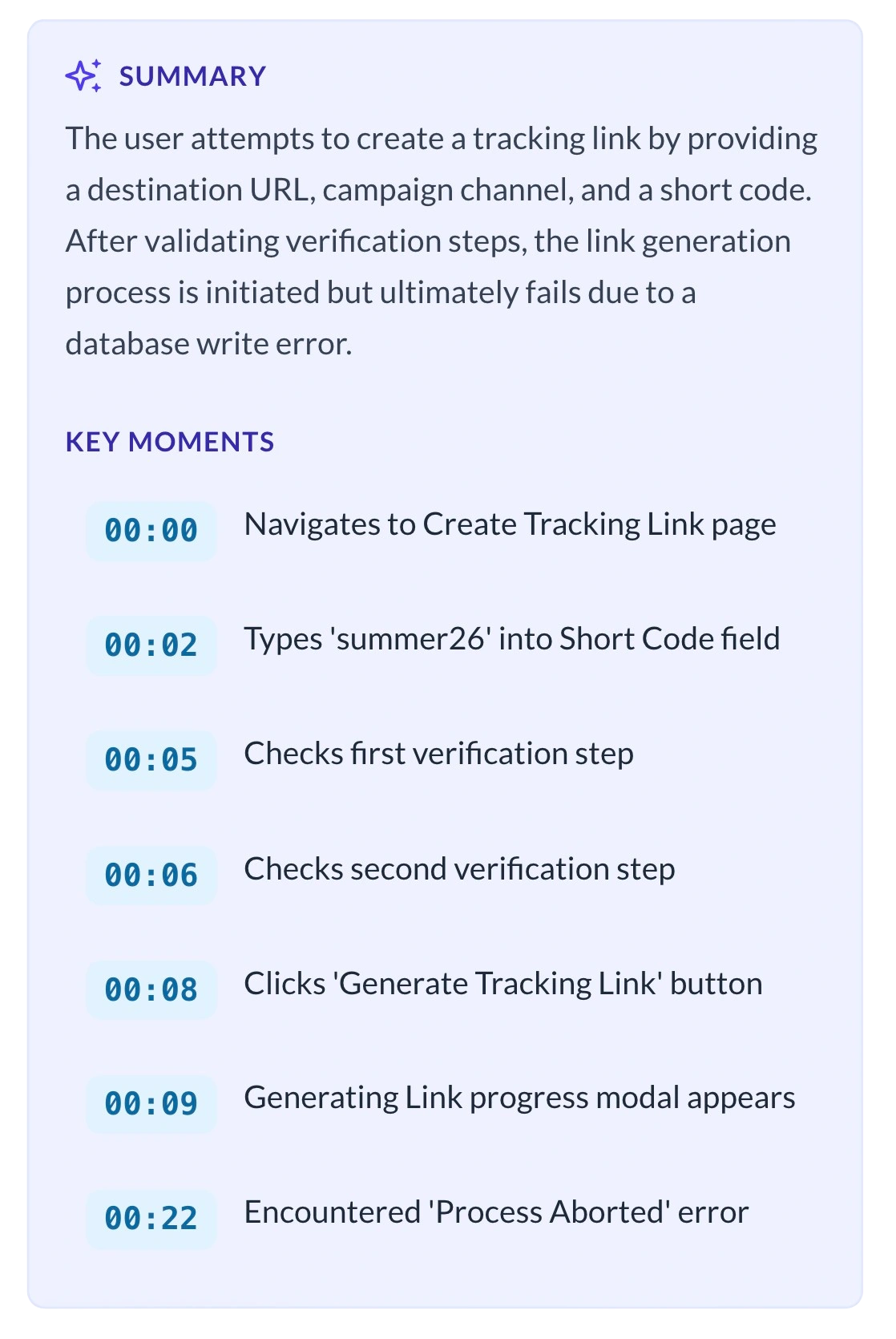
Don't watch the whole video. Just read the AI summary.
Receiving a detailed 5-minute update from a client is great for context, but it takes time to review. Our built-in AI helps you digest client feedback faster.
- Instant Text Recaps: Inside the ScreenReply viewer, our AI automatically analyzes the client's recording and generates a concise text summary of their feedback or questions.
- Clickable Timecodes: The AI identifies exactly when the client asks a question or demonstrates a process, providing clickable timestamps so you can jump straight to the action.
Enterprise-Grade Security for Client Data
Client account reviews and onboarding sessions often contain sensitive business data. Use our secure cloud hosting, or seamlessly connect your own Amazon S3-compatible storage bucket. When you use your own S3, client recordings never touch our storage servers, ensuring total compliance with your strict security policies.
Frequently Asked Questions
Why is this better than scheduling a quick Zoom call?
Scheduling calls creates unnecessary friction and delays. By recording a video, you provide a personalized, white-glove experience asynchronously. Clients can watch your onboarding materials or report walkthroughs on their own schedule, saving hours of back-and-forth calendar tetris.
Will my clients need to download a screen recorder?
No. If you request a video from a client (e.g., to see their current setup), they just open the link in their browser and click "Record". It works natively in Chrome, Safari, Edge, and Firefox without requiring them to install any extensions or create an account.
Can I customize the recording interface to match our company's brand?
Yes. We understand that Client Success teams need to maintain a professional appearance. ScreenReply allows you to white-label the recording experience. When your clients click a link to record or watch a video, they will see your logo and brand colors, ensuring a seamless and trusted experience.
Is this only for bug tracking?
Not at all. While great for support, Account Managers use ScreenReply for any scenario where visual context helps. You can record your own screen to explain a new feature, or ask a client to record their workflow so you can give them tailored advice on how to use your product better.
Can I use ScreenReply to record my own screen for client onboarding?
Yes, absolutely. Account managers frequently record their own screens to create personalized onboarding walkthroughs, explain quarterly reports, or demonstrate new features. It feels much more personal than a generic email and helps build trust with your clients.
How do I share a video recording with a client who doesn't use our CRM?
ScreenReply generates a simple shareable link for every video. You can paste this link into any email, Slack message, or calendar invite. The recipient does not need any special software or account to watch the video or the AI-generated summary.
How long are client recordings stored?
With our default cloud storage, recordings are kept for 60 days. If you connect your own S3 bucket, recordings are stored indefinitely and you have full control over retention policies. This is especially useful for long-term client reference materials.
Build stronger client relationships today
Stop relying on walls of text. Provide asynchronous, personalized video updates that your clients will love.
14-day free trial. Unlimited recordings.