Screen recording for
IT Helpdesk Teams
Record your screen to walk employees through technical fixes, or request one-click video recordings directly from your ticketing system—no apps or admin permissions required.
14-day free trial. Unlimited recordings.
Why Text-Based Tickets Are Slowing Down IT
Vague descriptions like "the system is broken" lead to endless back-and-forth. Give your IT team the visual clarity they need to resolve internal tickets instantly.
Resolve Tickets Faster
Stop guessing what the employee clicked. Seeing their exact screen and workflow allows your team to pinpoint the issue and provide an accurate solution on the very first reply.
Eliminate "Quick Calls"
Not every password reset or software glitch requires a 15-minute screen-sharing session. Provide asynchronous video solutions that employees can follow on their own time.
Capture Context Instantly
If an employee is stuck on a workflow, send them a recording link. They can show you exactly what error they are seeing without trying to explain complex technical details in text.
Zero friction for your employees
The biggest barrier to getting a screen recording is the hassle of installing software. With ScreenReply, the employee simply clicks your link and records directly from their browser. No extensions, no admin permissions, and no complicated sign-ins.
Review the video and AI summary
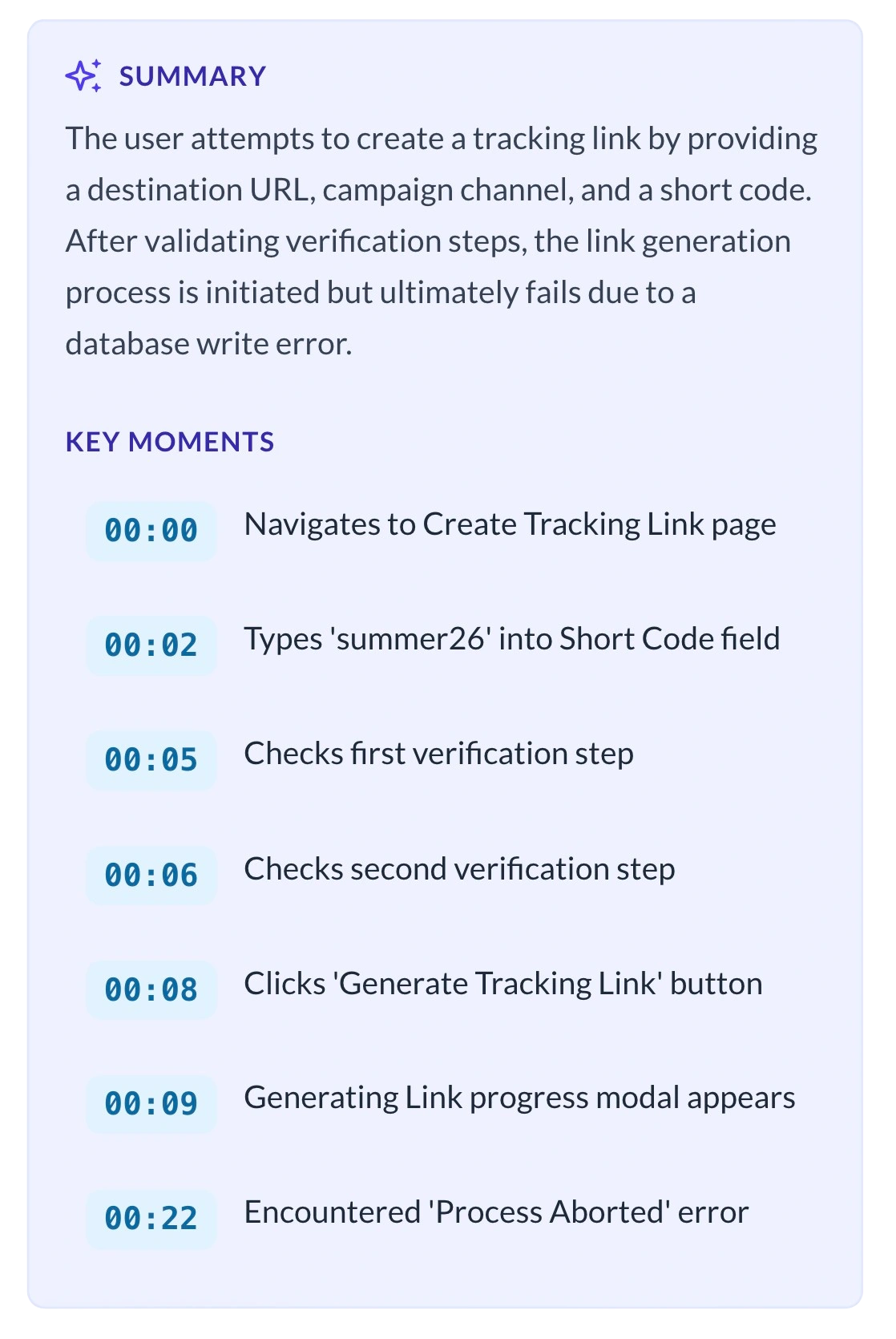
As soon as the employee stops recording, the video is securely uploaded. Open the link directly in the ScreenReply interface to watch the high-quality playback and review AI-generated text summaries with clickable timecodes, helping you jump straight to the exact moment the issue occurs.
Why not use traditional screen recorders?
Traditional tools are built for external marketing or async updates. They are not designed to collect videos from non-technical employees without admin rights.
Traditional Recorders
- • Employee must have admin rights to install a desktop app.
- • Requires downloading and managing large MP4 files locally.
- • Employee must manually upload the video file into the ticketing system.
- • IT team wastes time organizing and downloading video attachments.
ScreenReply
- 100% browser-based. Zero installations or admin rights required.
- No local files. Video is securely hosted and instantly playable.
- Video is automatically synced to the internal ticket timeline.
- Generate requests directly from your existing IT helpdesk tools.
Don't watch the whole video. Just read the AI summary.
Receiving a 5-minute screen recording from an employee is great for context, but terrible for your IT agent's time. We solved this.
- Instant Text Recaps: Inside the ScreenReply interface, our AI automatically analyzes the employee's recording and generates a concise text summary of the issue or question.
- Clickable Timecodes: The AI identifies the exact moments where the employee encounters an error or explains a specific workflow, providing direct timestamps you can click to jump straight to that part of the video.
Total Control Over Internal Data Security
Internal IT tickets often display sensitive employee data, internal dashboards, or credentials. Use our secure cloud hosting, or seamlessly connect your company's own Amazon S3-compatible storage bucket. By saving the final video files directly to your own infrastructure, your IT department maintains complete ownership over the data, making it easy to enforce custom retention rules and align with internal privacy policies.
Frequently Asked Questions
Why is this better than jumping on a quick Zoom or Teams call?
Live calls force both the IT agent and the employee to sync schedules, disrupting deep work. ScreenReply lets employees show the problem exactly when it happens, and your IT team can review and resolve it asynchronously, saving hours of screen-sharing sessions every week.
Will my non-technical colleagues need admin rights to install this?
No. When an employee clicks your request link, they record directly through their browser (Chrome, Edge, Safari, Firefox). It works natively without requiring any admin permissions, extensions, or software downloads.
Is this only for reporting bugs or errors?
Not at all. ScreenReply is designed for general screen recording requests. IT teams use it to request recordings of software setup workflows, audit evidence, system access requests, or just general "how do I do this" questions from employees.
Can I record my own screen to show an employee how to fix something?
Yes! IT Helpdesk agents can easily record a walkthrough of a setting change, software installation, or VPN setup, and drop the link back into the ticket. This closes issues much faster than typing out a 10-step manual.
What if an employee is working from home on a personal device?
ScreenReply works on any device with a modern browser, including personal laptops and home computers. Since there is no software to install, employees can record their screen from any machine without needing IT to pre-configure it.
How do employees access the recording link?
You send the recording link directly through your ticketing system, by email, or through Slack. The employee just clicks the link, and their browser opens the recording page. No login, no password, no app download needed.
Can we store recordings on our company's own servers?
Yes, you can connect your own S3-compatible storage. When you use your own S3, recordings are uploaded directly to your infrastructure and never touch ScreenReply's storage servers. This gives your IT department full control over data retention, backups, and security.
Upgrade your internal IT support today
Stop deciphering text descriptions of technical issues. See exactly what your employees see with one-click screen recordings.
14-day free trial. Unlimited recordings.