Screen Recording for
Client Services Teams
Deliver complex reports, pitch creative concepts, and collect precise client feedback effortlessly. Replace long emails and endless Zoom meetings with one-click async videos.
14-day free trial. Unlimited users & recordings.
Why Email-Only Communication Delays Client Projects
Complex deliverables, design mockups, and monthly reports get lost in translation over text. Give your clients the clear, personalized visual context they need.
Deliver High-Touch Presentations
Stop sending generic PDF attachments. Record a personalized video walking your client through their campaign results or strategy documents, explaining the value directly.
Eliminate Scheduling Ping-Pong
Not every sprint review or status update requires coordinating a 30-minute Zoom call across time zones. Send an asynchronous update that stakeholders can watch on their own schedule.
Capture Precise Feedback
Instead of deciphering vague email replies, send a recording link. The client can record their screen, pointing exactly to the changes they want on a design mockup or staging site.
Zero friction for your clients
Busy stakeholders won't install new software just to give you project feedback. With ScreenReply, your client simply clicks your link and records directly from their browser. No extensions, no account creation. Ensure a seamless, premium experience by white-labeling the interface with your agency's branding.
Review the video and AI summary
When the client finishes recording, the video is instantly available. Open the link in the ScreenReply interface to watch the high-quality playback, read the AI-generated summary, and use clickable timestamps to jump straight to their action items and revision requests.
Why not use traditional screen recorders?
Traditional recording tools are built for internal team collaboration. They create unnecessary hurdles when asking busy external clients for feedback.
Traditional Recorders
- • Client must install a browser extension or heavy desktop app.
- • Client is forced to create an account and remember passwords.
- • Client must manually copy the video link and paste it into an email to you.
- • Project managers have to leave their CRM to track client replies.
ScreenReply
- 100% browser-based. Zero client installations required.
- No client accounts, sign-ins, or complicated setups.
- Video is automatically uploaded and attached to the project thread.
- Generate requests directly from HubSpot, Attio, Front, or Intercom.
Don't watch the whole video. Just read the AI summary.
Receiving a detailed 5-minute piece of feedback from a client is great for context, but it takes time to review. Our built-in AI helps you digest client revisions faster.
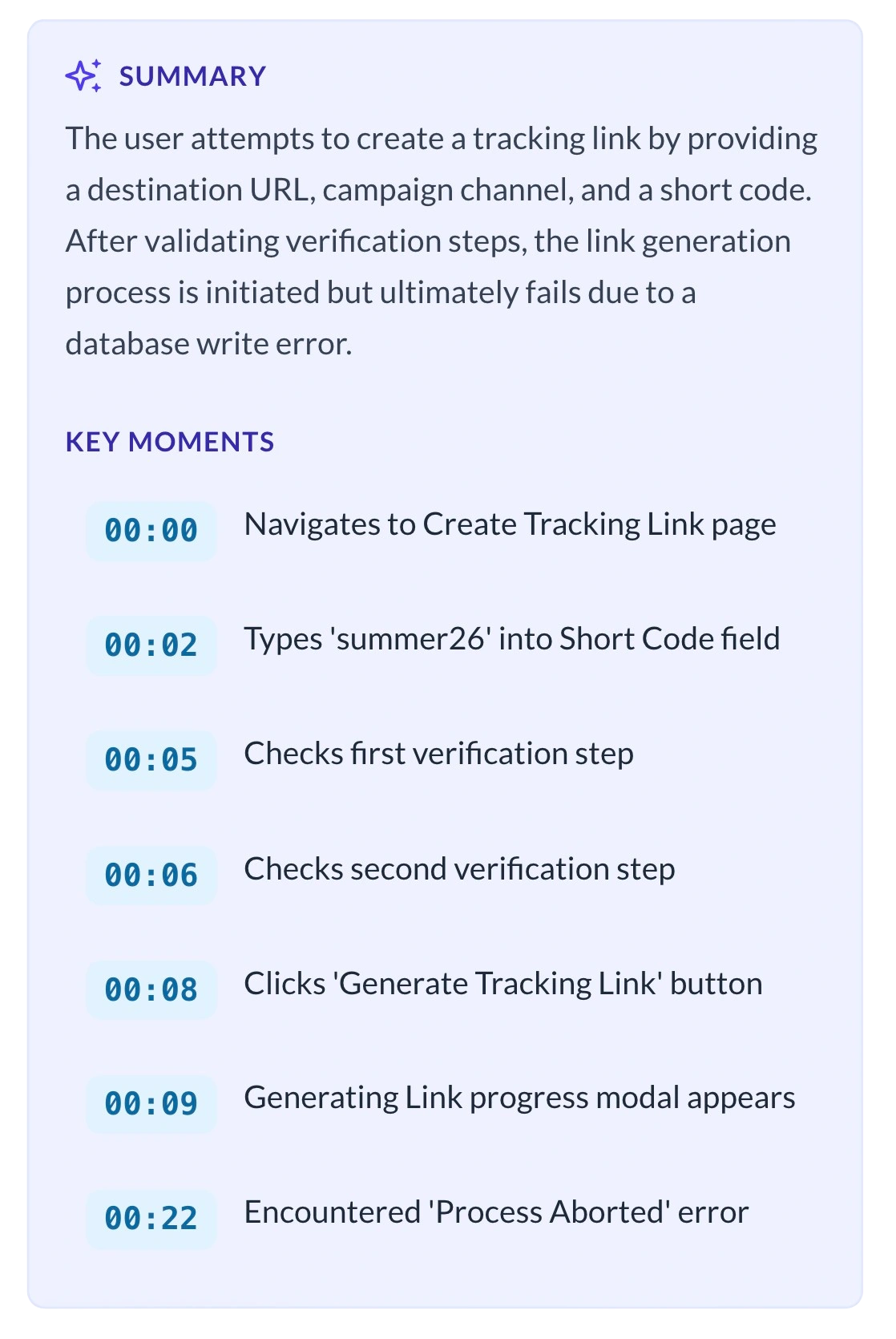
- Instant Text Recaps: Inside the ScreenReply viewer, our AI automatically analyzes the client's recording and generates a concise text summary of their feedback and action items.
- Clickable Timecodes: The AI identifies exactly when the client asks a question or points to a specific part of a deliverable, providing clickable timestamps so you can jump straight to the action.
Total Control Over Client Data Security
Client deliverables and strategy sessions often contain sensitive business data. Use our secure cloud hosting, or seamlessly connect your agency's own Amazon S3-compatible storage bucket. By saving the final video files directly to your own infrastructure, you maintain complete ownership over the data, making it easier to enforce custom retention rules and align with your clients' strict NDAs.
Frequently Asked Questions
Why is this better than scheduling a weekly review call?
Scheduling calls creates unnecessary friction and delays project timelines. By recording a video, you provide a personalized, white-glove presentation asynchronously. Clients can review your deliverables and reports on their own schedule, saving hours of back-and-forth calendar tetris.
Will my non-technical clients need to download anything to leave feedback?
No. When you request a video from a client (e.g., to get design feedback), they just open the link in their browser and click "Record". It works natively in Chrome, Safari, Edge, and Firefox without requiring them to install any extensions or create an account.
Can we brand the recording page with our agency's logo?
Yes. We understand that Client Services teams need to maintain a highly professional appearance. ScreenReply allows you to white-label the recording experience. When your clients click a link to record or watch a video, they will see your agency's logo and brand colors.
Is this only for collecting client feedback?
Not at all. While requesting videos from clients is a powerful feature, Client Services professionals frequently use ScreenReply to record their own screens. It's the perfect way to present a new proposal, explain a complex monthly report, or walk a client through a new workflow asynchronously.
Deliver better client experiences today
Stop relying on walls of text and mandatory meetings. Provide asynchronous, personalized video updates that your clients will love.
14-day free trial. Unlimited users & recordings.