
The Static Trap: Why Screenshots Are Insufficient for Reproducing Dynamic Web Errors
Sat Jan 24 2026
Introduction
It is a scenario played out in support departments thousands of times a day across the globe.
A customer submits a critical ticket: “Your dashboard is broken. I can’t export my report.” Attached to the ticket is a screenshot. It shows the dashboard, perhaps with a generic error toaster message in the corner saying “Something went wrong.”
The support agent opens the ticket, looks at the screenshot, logs into their own test account, navigates to the same dashboard, and clicks the export button.
It works perfectly.
The agent, bound by process and unable to replicate the issue, replies: “I cannot reproduce this on my end. It seems to be working fine. Could you try clearing your cache?”
The customer receives this, frustrated. They know it’s broken. They sent proof. Why are they being told to clear their cache for the third time this month?
This creates a cycle of friction known as the “It Works on My Machine” syndrome. The root cause of this failure isn’t incompetence; it’s reliance on an outdated tool for modern problems.
In the era of complex, single-page web applications (SPAs), relying on static screenshots to diagnose dynamic problems is a fundamental workflow flaw. A screenshot captures the symptom at a frozen moment in time, but it completely fails to capture the cause.
In this article, we will dissect why the modern web has outpaced static image reporting, the hidden operational costs of relying on screenshots, and why shifting to asynchronous video evidence is the only viable path forward for efficient B2B SaaS support.
The Dynamic Web vs. The Static Snapshot
Twenty years ago, the web was largely static. If a page loaded incorrectly, a screenshot was often enough. The HTML was delivered from the server, and what you saw was generally what you got.
Today, the B2B SaaS landscape is dominated by complex JavaScript frameworks like React, Vue, and Angular. A modern web application is highly dynamic state machine.
- Content loads asynchronously via AJAX requests.
- Elements appear and disappear based on user hovering or clicking.
- Complex validation logic runs in the background before a form is even submitted.
When an error occurs in this environment, it is rarely because a static image loaded incorrectly. It is almost always a failure of process, state, or sequence.
The Limitation of “Noun” Reporting
Think of troubleshooting like investigating a car accident. A screenshot is like a photograph of the two crashed cars after they have come to a stop. It proves there was an accident.
But to understand why the accident happened, you need to know what the drivers were doing ten seconds prior. Were they speeding? Did they run a red light? Was the road icy?
A screenshot is a “noun”—it shows what is currently on the screen. Troubleshooting requires “verbs”—it requires knowing how the user got there.
When support teams rely on screenshots, they are asking agents to reconstruct a complex series of events based solely on the final outcome. It is an impossible task that inevitably leads to high rates of “cannot reproduce” (CNR) ticket resolutions.
The “Screenshot Iceberg”—What You Don’t See
The most dangerous aspect of a screenshot is the illusion of completeness. It looks like proof, so agents treat it as the totality of the evidence.
However, what is visible in a screenshot is only about 10% of the data required to actually debug a modern web application error.
Below the surface, invisible to the static image, lies the critical context that engineering teams need.
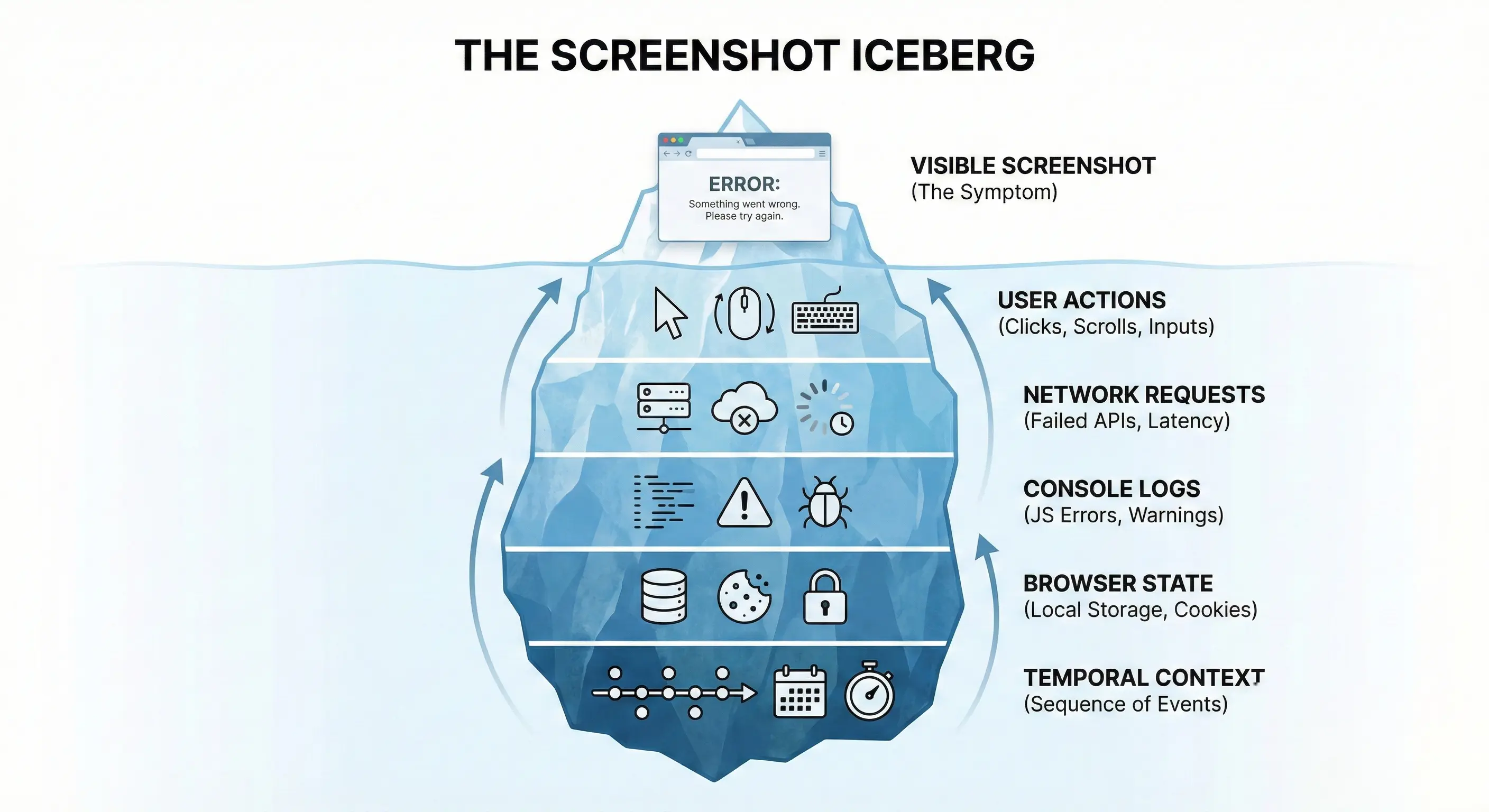
Let’s break down the critical missing data:
1. The Invisible Sequence of Actions
A screenshot shows a modal window stuck open. It doesn’t show that the user double-clicked the trigger button rapidly, causing a race condition in the JavaScript that locked the UI. Without seeing the double-click action, the developer will test with a single click and find no issue.
2. The Hidden Network Failure
A screenshot shows an empty data table. The agent assumes there is no data. But in reality, a background API call to fetch the data failed with a 500 Internal Server Error, which is hidden in the browser’s network tab. The screenshot doesn’t show the failed request; it just shows the empty result.
3. The Console Noise
Modern web apps spit out hundreds of logs, warnings, and errors into the browser console every minute. The critical clue—perhaps a specific JavaScript “undefined is not an object” error triggered by a specific user permutation—is hidden behind the rendered webpage.
By relying on screenshots, support teams are effectively asking customers to be QA engineers, expecting them to know how to open developer tools and take screenshots of technical logs.
The Operational Cost of Static Reporting
The reliance on insufficient evidence doesn’t just frustrate customers; it creates massive operational drag within the support organization.
When an agent receives a screenshot that doesn’t tell the whole story, they cannot escalate it to engineering. Engineers demand steps to reproduce.
This triggers the painful “investigation ping-pong” cycle. The agent must go back to the customer to fish for the missing context that the screenshot failed to provide.
- Agent: “Thanks for the screenshot. Can you tell me exactly what you clicked right before this happened?”
- (24 hours later due to timezones) Customer: “I was just trying to save the file.”
- Agent: “Okay, were you using the ‘Save As’ menu or the quick save button icon?”
- (Another 24 hours later) Customer: “The icon.”
- Agent: “I still can’t reproduce it. What browser extensions are you running?”
A resolution process that should have taken 30 minutes stretches into four days.
The “Evidence Gap” Workflow Failure
This diagram illustrates how static evidence creates a barrier between support and engineering, forcing a looping workflow that drains resources.

Every loop in this process costs money in agent time and costs goodwill in customer sentiment.
The Paradigm Shift—Asynchronous Video Evidence
If the problem is that screenshots only capture “nouns” (static states), the solution must capture “verbs” (actions and sequences).
The shift from static image reporting to asynchronous video reporting is not just a minor upgrade; it is a fundamental paradigm shift in how web software is supported.
Video is the equalizer. It removes the variables of interpretation and memory. It provides indisputable proof not just of the error, but of the journey to the error.
When a customer provides a 30-second screen recording instead of a screenshot, the support dynamic changes instantly:
- Instant Reproduction: The agent doesn’t have to guess the steps; they watch them. They can mimic the exact mouse movements and inputs on their own machine.
- Undeniable Proof: There is no room for “it works on my machine.” If the video shows it breaking, it is broken. The conversation shifts from if there is a bug to why there is a bug.
- Capturing the Invisible: High-quality modern screen recording tools don’t just capture the pixels; they can capture the environment—browser version, OS, and sometimes even network states—simultaneously.
Video bridges the gap between the non-technical user’s experience and the technical engineer’s need for data.
Removing Friction with ScreenReply
If video is so superior, why isn’t it the standard? Historically, the friction was too high.
Asking a frustrated B2B customer to download specialized screen recording software, install it, record a video, export a massive file, upload it to a third-party service, and share a link is a non-starter. They will default back to the easiest option: the Snipping Tool and a pasted screenshot.
To make video the standard for support, it must be as easy as taking a screenshot.
The “No-Install” Requirement
This is the specific challenge we addressed with ScreenReply. We recognized that for support teams to get the dynamic evidence they need, the capture process for the customer must be zero-friction.
ScreenReply is designed specifically for the B2B support use case:
- Browser-Based Capture: It runs entirely in the browser. No .exe files, no extensions to install, no IT approval needed on the customer’s end.
- Agent-Initiated Workflows: Support agents can send a one-click recording link within the ticket. The customer clicks, records the issue, and submits.
- Instant Availability: The video is instantly available to the agent, reducing the “ping-pong” cycle from days to minutes.
By lowering the barrier to entry for video creation, you empower your customers to provide the level of evidence required to solve modern web challenges.
Comparison Table: The Evidence Spectrum
| Feature | Text Description | Screenshot | Asynchronous Video (ScreenReply) |
|---|---|---|---|
| Captures Error Symptom | Vague | High | High |
| Captures User Steps/Actions | Poor (Relies on memory) | None | Perfect |
| Captures Temporal Context | None | None | High (Shows sequence) |
| Captures Dynamic States | None | Low (Only frozen state) | High (Shows transitions) |
| Customer Effort to Create | Medium | Low | Low (With right tools) |
| Agent Reproduction Rate | Low (<30%) | Medium (~50%) | Very High (>90%) |
Conclusion
The reliance on screenshots for troubleshooting complex SaaS products is a legacy habit from a simpler web era. In today’s dynamic application environment, a static image is often a misleading artifact that shows the what but hides the why.
Continuing to accept screenshots as primary evidence leads to wasted agent hours, frustrating “cannot reproduce” loops, and stalled engineering tickets.
To improve resolution times and reproduction rates, support leaders must recognize the limitations of static reporting. Shifting to an asynchronous video-first workflow isn’t just about getting better data; it’s about respecting your customers’ time by fixing their issues the first time they report them.
Stop asking your customers to freeze-frame a moving target. Start asking them to show you the motion.
Ready to stop the “It Works on My Machine” cycle? Equip your support team with the easiest way to gather dynamic video evidence from customers, with zero installs. 👉 Start using ScreenReply today at screenreply.com.