
The 'Zombie Ticket' Epidemic: How to Slash Reopening Rates with Visual Evidence
Tue Jan 20 2026
Introduction
Every support manager knows the “Zombie Ticket” phenomenon.
You close a ticket, confident that the issue is resolved. The metrics look good. Then, 24 hours later, the ticket reopens with a frustrated reply: “I tried what you said, but it’s still not working.”
Why does this happen?
In 90% of cases, it’s not because your agent is incompetent. It’s because your agent solved the wrong problem.
They relied on a customer’s vague text description (e.g., “The report won’t load”), guessed the most likely cause, and sent a standard fix. But the actual issue wasn’t a standard error—it was a browser conflict, a permissions issue, or a specific sequence of clicks that the text didn’t capture.
A high Ticket Reopening Rate (TRR) is a symptom of a “Diagnostic Gap.” If you can’t see the problem, you are just guessing at the solution.
In this article, we’ll explore why text-based bug reporting is the root cause of reopenings and how shifting to customer-generated video evidence ensures you fix the issue right the first time.
The “Guessing Game” of Text Support
Why do tickets come back from the dead? Because the initial diagnosis was flawed.
Text is an abstract medium trying to describe a concrete reality. When a non-technical customer writes, “I can’t save the form,” they are omitting critical context:
- Are they clicking the button and nothing happens?
- Is the button greyed out?
- Is there an error message flashing for 0.5 seconds?
Your agent reads the text, assumes it’s a caching issue, and replies: “Please clear your cache.”
The customer clears the cache. It doesn’t help. They reopen the ticket. Now they are annoyed, and you are starting over.
The Misdiagnosis Cycle
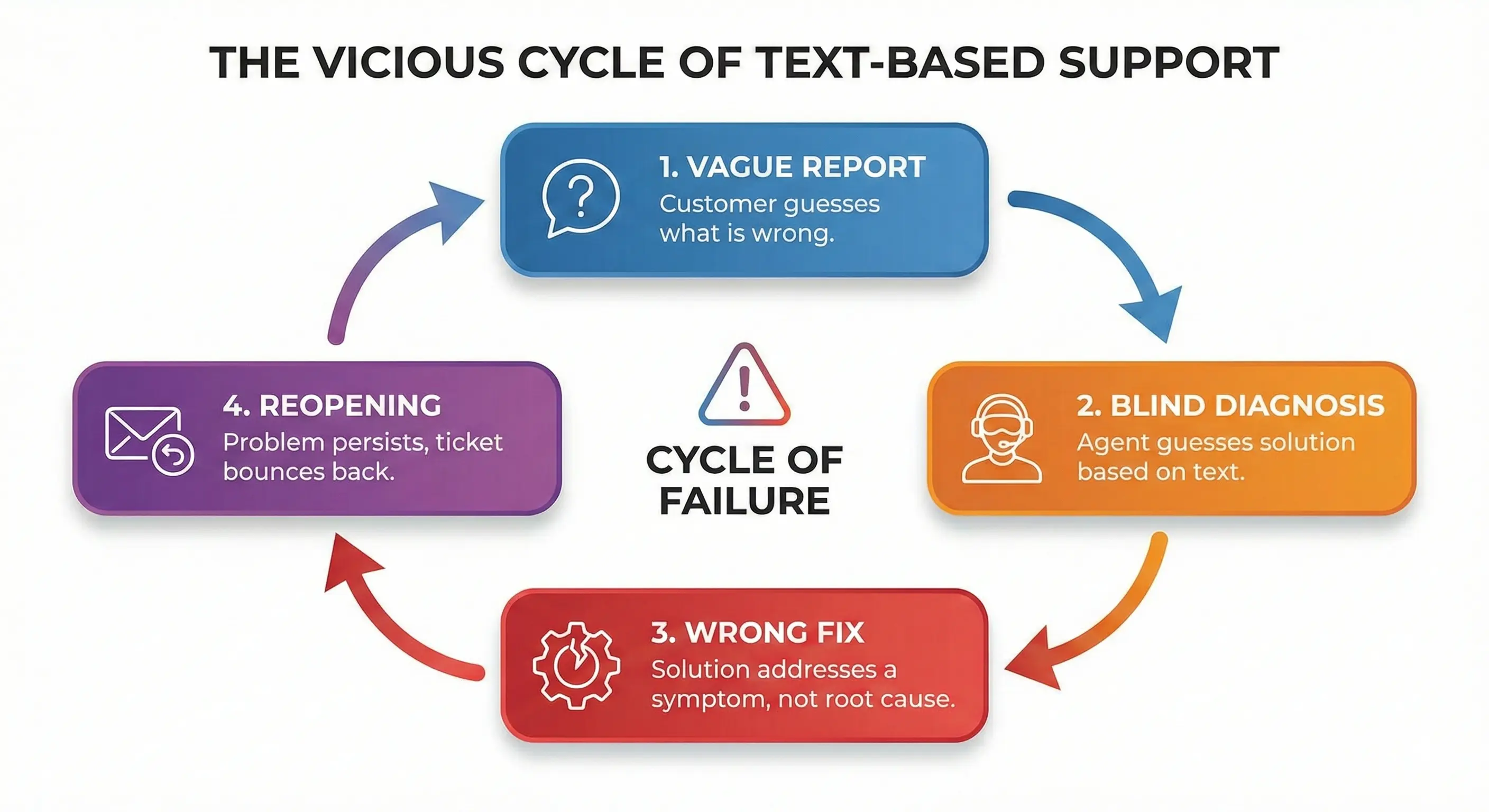
Without visual proof, your agents are forced to play detective with incomplete clues. This leads to a vicious cycle:
- Vague Report: Customer guesses what is wrong.
- Blind Diagnosis: Agent guesses the solution based on the text.
- Wrong Fix: The solution addresses a symptom, not the root cause.
- Reopening: The problem persists, and the ticket bounces back.
The True Cost of Reopened Tickets
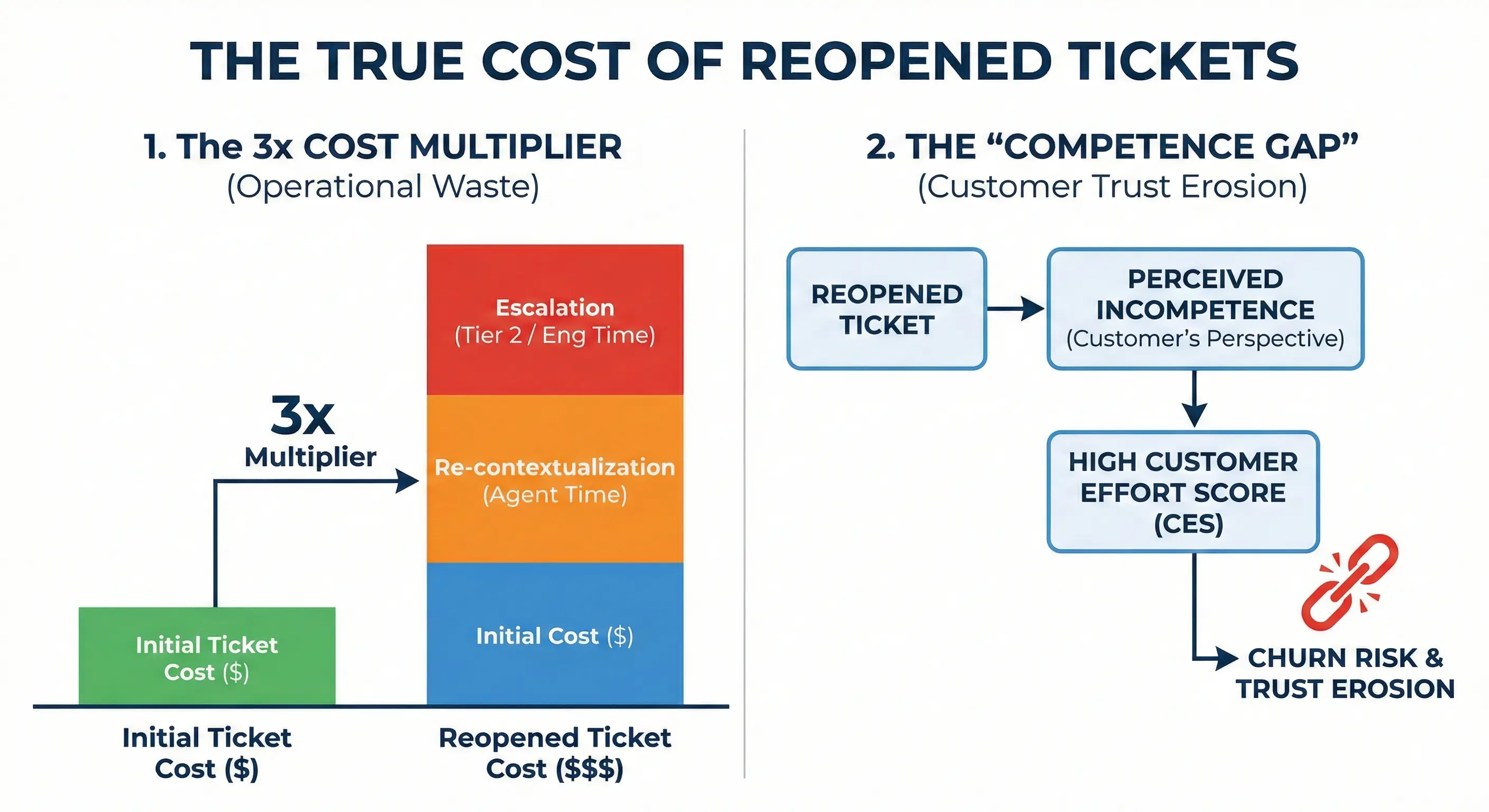
“Zombie tickets” are arguably the most expensive tickets in your queue. They represent a double failure: operational waste and customer trust erosion.
1. The 3x Cost Multiplier
A reopened ticket is not just “one more interaction.” It requires:
- Re-contextualization: The agent has to re-read the entire thread to remember what was already tried.
- Escalation: Reopened tickets are often flagged as “at-risk” and escalated to Tier 2 or Engineering, consuming expensive salary hours for what might be a simple issue.
2. The “Competence Gap”
From the customer’s perspective, a reopened ticket looks like incompetence. They don’t know that their description was bad; they just know that your team “couldn’t fix it.”
If a customer has to explain their problem three times to get one solution, their Customer Effort Score (CES) skyrockets, which is the strongest predictor of churn.
The Fix—Visual Evidence Before the Solution
To slash reopening rates, you need to change the workflow. You must move from “Guess and Check” to “See and Solve.”
The goal is to get the customer to show you the problem before you offer a single solution.
When an agent watches a 30-second screen recording of the issue, the “Diagnostic Gap” vanishes.
- They see the console error.
- They see the mouse movement.
- They see the exact moment the app fails.
With this data, the agent doesn’t send a probable fix; they send the definitive fix.
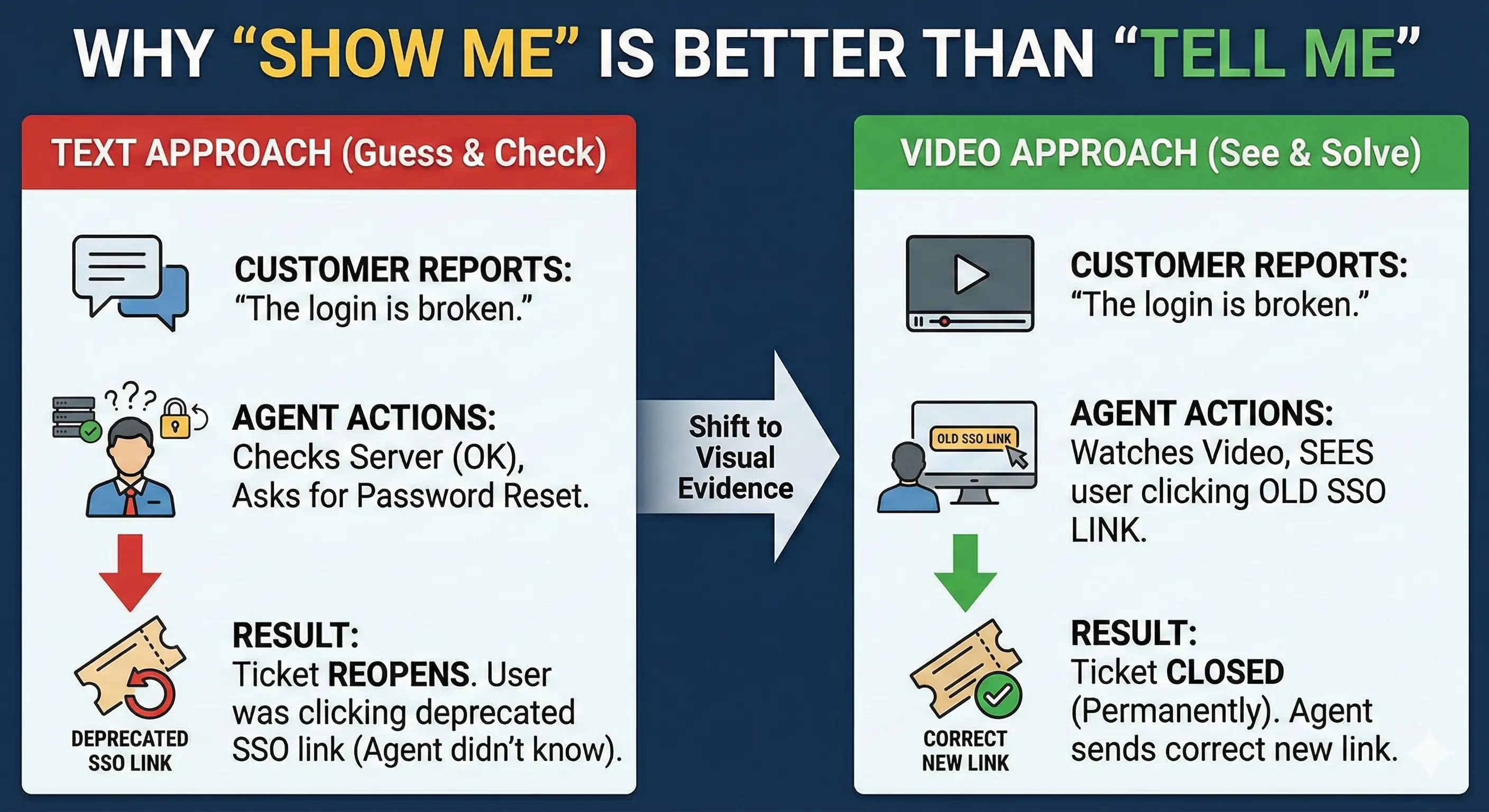
Why “Show Me” is Better Than “Tell Me”
Imagine a customer reports: “The login is broken.”
- Text Approach: Agent checks server status (OK), asks user to reset password. Result: Ticket reopens because the user was actually trying to log in via a deprecated SSO link.
- Video Approach: Agent watches the video, sees the user clicking the old SSO link. Result: Agent sends the correct new link. Ticket Closed (Permanently).
Removing the Friction (Why Customers Don’t Record)
If video is so great, why don’t customers send it automatically?
Friction.
Historically, asking a customer to record a video was a huge request: “Please download this app, install it, record your screen, save the file, upload it to Drive, and send me the link.”
No customer wants to do that. They will just type a vague email instead.
The “No-Install” Solution: ScreenReply
This is why we built ScreenReply. We realized that to get visual evidence from customers, the process must be easier than typing.
ScreenReply changes the dynamic:
- Agent initiates: The agent sends a link: “I want to make sure I fix this right the first time. Can you click this link to record the error? No install needed.”
- Customer clicks: The recorder opens directly in the browser.
- Instant Submit: The customer stops recording, and the link is generated instantly.
By removing the “Download” barrier, you dramatically increase the number of customers willing to provide visual evidence.
Implementation Strategy
How do you implement this to stop ticket reopenings?
Phase 1: The “Reopen” Trigger
Start with the tickets that have already reopened.
- Scenario: A customer replies “That didn’t work.”
- Action: Do not send another text guess. Reply: “I apologize that didn’t fix it. To ensure I don’t waste any more of your time, could you please record the issue using this [ScreenReply Link] so I can see exactly what’s happening?”
Phase 2: The “Complex” Triage
Identify categories of tickets that have high reopening rates (e.g., “Bug Report”, “Integration Error”).
- Action: Set up an auto-response or macro for these categories that requests a recording before the agent even investigates.
Comparison: The Impact on Quality
| Metric | Text-Based Diagnosis | Video-Based Diagnosis |
|---|---|---|
| Understanding of Root Cause | Low (Guesswork) | High (Visual Confirmation) |
| Risk of Wrong Fix | High | Near Zero |
| Customer Effort | High (Writing/Explaining) | Low (Click & Show) |
| Reopening Rate | 10-15% | < 2% |
Conclusion
You cannot fix what you cannot see.
A high Ticket Reopening Rate is usually not a failure of technical skill; it is a failure of visibility. By relying on text, you are forcing your agents to gamble on solutions.
Switching to a Video-First Diagnosis model protects your team from wasting time on wrong fixes and protects your customers from the frustration of repeated complaints.
Don’t wait for the ticket to reopen. Ask to see the problem now.
Ready to see the bugs your customers are facing? Start using ScreenReply to get instant, no-install video reports from your users. 👉 screenreply.com