
The Hidden Cost of Back-and-Forth Emails in Tier 1 Technical Support
Sun Jan 18 2026
Introduction
If you run a SaaS company, you know this scenario by heart.
A customer submits a ticket: “The export button isn’t working.”
Your Tier 1 agent checks the logs. Everything looks fine. They reply: “Can you please clarify what happens when you click it? Also, which browser are you using?”
Six hours later, the customer replies: “Chrome. It just spins.”
The agent tries to reproduce it on Chrome. It works fine for them. They reply again: “I can’t reproduce this. Can you send a screenshot?”
The next day, the customer sends a static screenshot of a loading spinner. It tells the agent absolutely nothing about why it’s spinning.
This is the “Email Ping-Pong” loop. It is the single biggest drain on support efficiency. While you are optimizing your Knowledge Base and deploying AI chatbots, this silent killer is inflating your Average Handling Time (AHT), frustrating your users, and burning through your support budget.
In this post, we’re going to look at the real math behind text-based troubleshooting and why smart SaaS teams are moving to an Async-Video First model.
The Economics of “Can You Clarify?”
We often look at support costs as a flat average—e.g., “$15 per ticket.” But averages are dangerous. They hide the outliers that destroy your margins.
A password reset ticket costs $2. A complex technical troubleshooting ticket that drags on for three days can easily cost $50 to $100.
Let’s break down the “Time Cost” of a standard technical issue handled via email versus video.
The Old Way: Text-Based Workflow
| Step | Action | Active Agent Time | Elapsed Time |
|---|---|---|---|
| 1 | Customer emails vague report | 5 min (Triage) | 0 hrs |
| 2 | Agent asks for details | 5 min | 4 hrs |
| 3 | Customer replies (partial info) | 5 min | 12 hrs |
| 4 | Agent fails to reproduce, asks for screenshot | 15 min | 24 hrs |
| 5 | Customer sends static screenshot | 5 min | 36 hrs |
| 6 | Agent escalates to Tier 2 (insufficient info) | 10 min | 48 hrs |
| TOTAL | An unresolved ticket | ~45 mins | 2+ Days |
The New Way: Visual Workflow (ScreenReply)
| Step | Action | Active Agent Time | Elapsed Time |
|---|---|---|---|
| 1 | Customer clicks “Record” (ScreenReply link) | 0 min | 0 hrs |
| 2 | Agent watches 45-sec video | 2 min | 2 hrs |
| 3 | Agent sees the error & console log in video | 5 min (Fix/File) | 2.5 hrs |
| TOTAL | Problem Identified | ~7 mins | < 3 Hours |
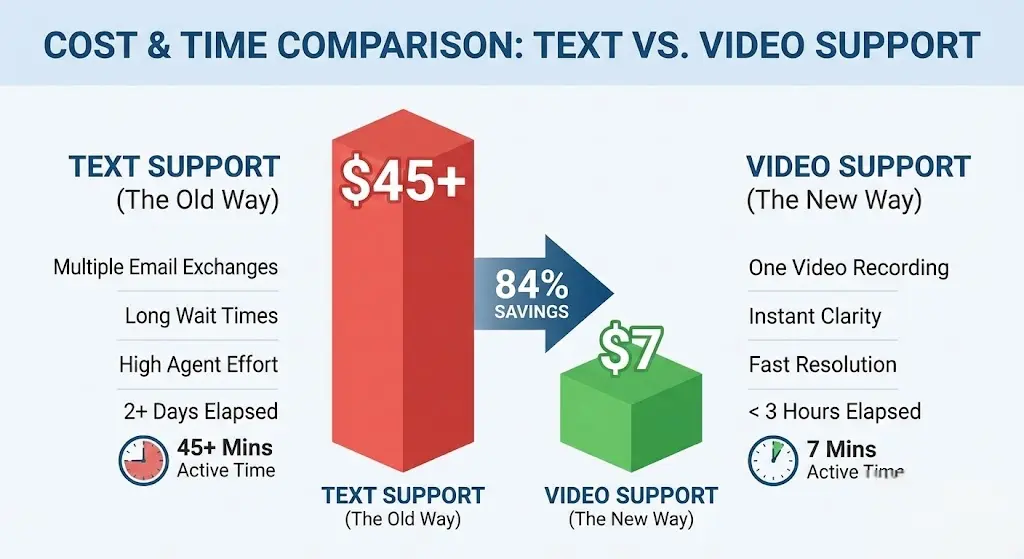
By switching the medium from text to video, you aren’t just saving 30 minutes of agent time. You are saving Customer Trust. In the SaaS world, waiting 48 hours for a solution is a churn signal.
The “Works on My Machine” Syndrome
The friction doesn’t end at Tier 1 support. It gets worse when the ticket hits the Engineering team.
Developers operate in a perfect world: local environments, fast internet, clean databases. Customers do not. When a support agent throws a vague ticket over the wall to engineering, the developer’s first instinct is to try and break it. If they can’t break it in 5 minutes, they reject the ticket: “Cannot Reproduce.”
This is the Reproducibility Gap.
Text is terrible at describing dynamic events. A user saying “It glitches when I scroll” omits critical variables:
- How fast were they scrolling?
- Did they have other tabs open?
- Was the network lagging?
Why Screenshots Are Obsolete
In 2026, web applications are dynamic. A screenshot captures a single pixel state. It does not capture the event.
- A screenshot shows the error message.
- A video shows what caused the error message.
Tools like ScreenReply act as a “Black Box” flight recorder for your user’s session. They provide the developer with indisputable proof of the bug. This eliminates the back-and-forth between Support and Engineering, drastically reducing the “Defect Rejection Rate.”
Why Zoom is Not the Answer
A common counter-argument I hear from founders is: “We handle complex issues by jumping on a Zoom call.”
While this is better than email, it’s not scalable. Synchronous support is expensive.
- Scheduling Hell: Finding a time slot that works for a client in London and a support agent in San Francisco can delay the fix by 24 hours.
- The “Holding Pattern”: A 10-minute fix turns into a 30-minute call. You lose time to pleasantries, connection issues, and screen-sharing setups.
- Zero Multitasking: An agent on a Zoom call is 100% blocked. An agent watching a video can process 10 other tickets in the same hour.
Asynchronous Video (like ScreenReply) gives you the high bandwidth of a Zoom call with the flexibility of an email. The customer records when they have the problem; the agent watches when they have the bandwidth.
The Psychology of “Customer Effort”
We often think that asking a customer to record a video is asking “too much.” The data suggests the opposite.
Writing is hard work. Asking a non-technical customer to explain a complex UI bug in writing is cognitively demanding. They have to:
- Remember the steps.
- Use the right terminology (Sidebar? Modal? Widget?).
- Format the email.
Customer Effort Score (CES) is a key metric for retention. High effort leads to churn.
When you offer a tool like ScreenReply, you are actually lowering the effort. You are saying: “Don’t worry about explaining it. Just show us.”
It removes the fear of being misunderstood. It empowers the user to be helpful without requiring them to be a technical writer.
The Solution: A “No-Friction” Video Tool
So, why haven’t all companies switched to video? Historically, the tools were the barrier.
Asking a customer to download software, install a browser extension, or sign up for an account just to report a bug adds more friction than writing an email.
This is exactly why we built ScreenReply. We focused on one thing: Velocity.
- No Install: It runs in the browser.
- No Signup for Customers: They don’t need an account to record.
- Instant Links: The video is ready to share the second they hit stop.
It’s designed specifically for the B2B support workflow, ensuring that you get the visual context you need without annoying your customers with “Download.exe” prompts.
How to Implement an “Async-First” Strategy
You don’t need to overhaul your entire support department overnight. Here is a 3-step plan to start reducing email ping-pong today.
Phase 1: The “Stuck” Protocol
Don’t force video on everyone immediately. Start with the tickets that are stuck.
- Rule: If a ticket has gone back and forth more than twice, stop typing.
- Action: Send a macro: “I want to make sure I fully understand what you’re seeing so we can fix this fast. Could you use this link [screenreply.com] to quickly record your screen? You don’t need to install anything.”
Phase 2: Internal Escalation
Make video mandatory for escalating bugs to engineering.
- Rule: No ticket goes to Jira without visual proof.
- Action: Support agents must replicate the issue and record it themselves before assigning it to a developer. This ensures developers never receive “vague” tickets.
Phase 3: Proactive Deflection
Once your team is comfortable, put the recording option upfront.
- Action: Add a “Record Screen” button next to your “Contact Support” form.
- Result: You will start receiving videos instead of vague text emails, solving problems before the first reply is even written.
Conclusion
The “hidden cost” of Tier 1 support isn’t the software you pay for; it’s the waste generated by translation errors.
Every time an agent has to ask “Can you explain that again?”, you are leaking money. You are paying for time that adds no value to the customer.
The shift to asynchronous video is not just a trend; it’s an operational necessity for modern SaaS. It respects your customer’s time, protects your engineering team’s focus, and drastically improves your unit economics.
Stop playing email ping-pong. Start solving problems.
Ready to streamline your support workflow? Start using ScreenReply today to close tickets faster. 👉 screenreply.com
Frequently Asked Questions
Is ScreenReply secure for business data?
Yes. Unlike public social video tools, ScreenReply is architected for business workflows. You can control data retention and ensure that sensitive bug reports don’t become public content.
Does it work on all browsers?
Absolutely. We support Chrome, Safari, Firefox, and Edge. We don’t believe in forcing your customers to switch browsers just to report a bug.
Can I try it for free?
Yes. We want you to experience the speed difference yourself. You can start recording immediately without a credit card.