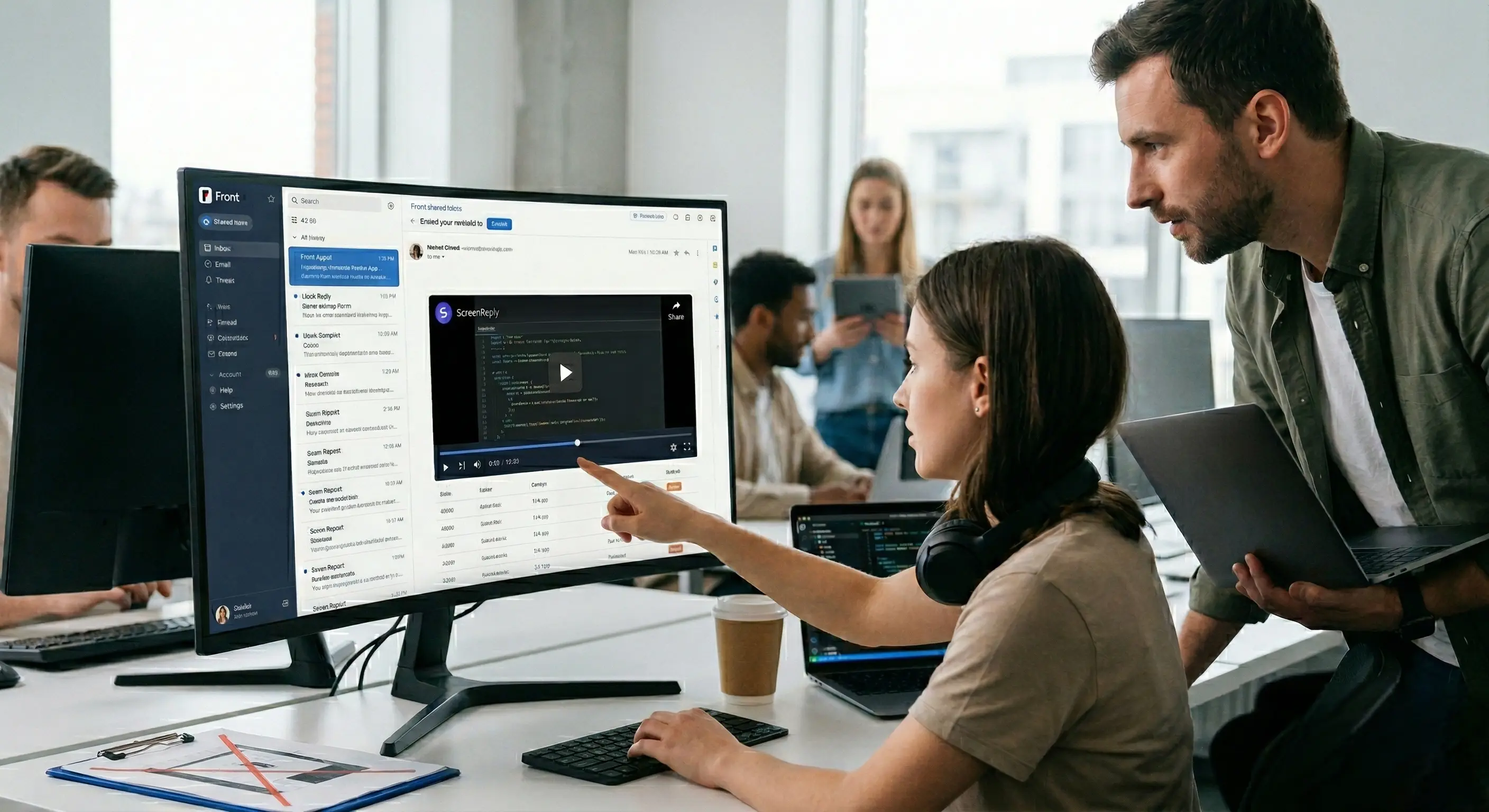
Beyond the Screenshot: Upgrading Bug Triage in Your Front Shared Inbox
Thu Mar 26 2026
Introduction: The Asynchronous Trap of the Shared Inbox
Front has revolutionized how B2B teams handle external communication. By bringing emails, SMS, and messages into a collaborative shared inbox, it destroyed the silos of individual support@ or info@ accounts. You can @mention an engineer on a customer thread, draft replies together, and manage complex escalations without forwarding a dozen messy emails.
But while the communication platform has evolved beautifully, the evidence we use to solve technical problems within those platforms remains frustratingly stuck in the past.
It is a scenario played out in thousands of B2B SaaS support departments every single day. A customer encounters a critical bug and fires off an email to your support address. Embedded in that email is almost always a static screenshot. It is the default language of technical frustration.
The customer expects that screenshot to be the smoking gun. They think: “I showed them the broken button, now they can fix it.” The support agent opens the Front thread, looks at the screenshot, logs into their own admin test account, navigates to the same dashboard, and clicks the button. It works perfectly. Bound by technical protocols and lacking actionable data, the agent is forced to reply: “I cannot reproduce this on my end. Everything seems to be operating normally. Have you tried clearing your cache and cookies?”
Instead of a quick fix, that initial screenshot triggers a days-long cycle of investigative ping-pong. It drains your team’s bandwidth, tests the customer’s patience, and inflates your Time to Resolution (TTR) metrics.
In this comprehensive guide, we will dissect why the modern web has outgrown static image reporting, uncover the hidden operational costs of the “please send a screenshot” loop inside Front, and demonstrate why shifting to zero-friction asynchronous video evidence is the only viable path forward for elite B2B support teams.
The Dynamic Web vs. The Static Email Snapshot
To understand why screenshots are fundamentally broken for modern support, we have to look at the intersection of modern web architecture and the nature of email.
Twenty years ago, the internet was a largely static place. If a webpage loaded incorrectly, a screenshot was often more than enough evidence. Today, the B2B SaaS landscape is dominated by complex, heavy JavaScript frameworks like React, Vue, and Angular. A modern web application is a highly dynamic, interconnected state machine.
- Asynchronous Loading: Content loads in the background via AJAX requests without refreshing the page.
- Dynamic Rendering: UI elements appear, change, and disappear based on complex conditional logic or specific click sequences.
- Client-Side Logic: Complex data validation runs directly in the user’s browser.
When an error occurs in this sophisticated environment, it is almost universally a failure of process, an invalid state, or an unexpected sequence of user actions.
The Limitation of “Noun” Reporting
Think of troubleshooting software like investigating a traffic collision. A screenshot is akin to a photograph of two smashed cars sitting in an intersection. It provides undeniable proof that an accident occurred.
But to understand why the accident happened, investigators need to know what the drivers were doing ten seconds prior. Who had the right of way? Was someone speeding?
A screenshot is a “noun”—it merely shows what is currently on the screen. Troubleshooting complex software requires “verbs”—it requires knowing how the user arrived at that broken state.
When Front support teams rely on screenshots attached to emails, they are asking their agents to reverse-engineer a complex series of dynamic events based solely on the final, static outcome. It is an impossible puzzle. And because email is an asynchronous medium—meaning a clarifying reply from a customer might take 24 hours—this lack of dynamic context is devastating to your SLA.
The “Keyhole Fallacy” of Bug Reporting
The core issue with accepting screenshots via email is what we call the Keyhole Fallacy.
When a customer takes a screenshot, they naturally crop it to focus strictly on the visual anomaly—the frozen loader, the greyed-out button, or the typo. They are showing you a view through a tiny keyhole. Because it looks like visual proof, agents and engineers often mistakenly treat it as the totality of the available evidence.
However, looking through that keyhole blinds your team to the entire “room” where the bug actually originated.
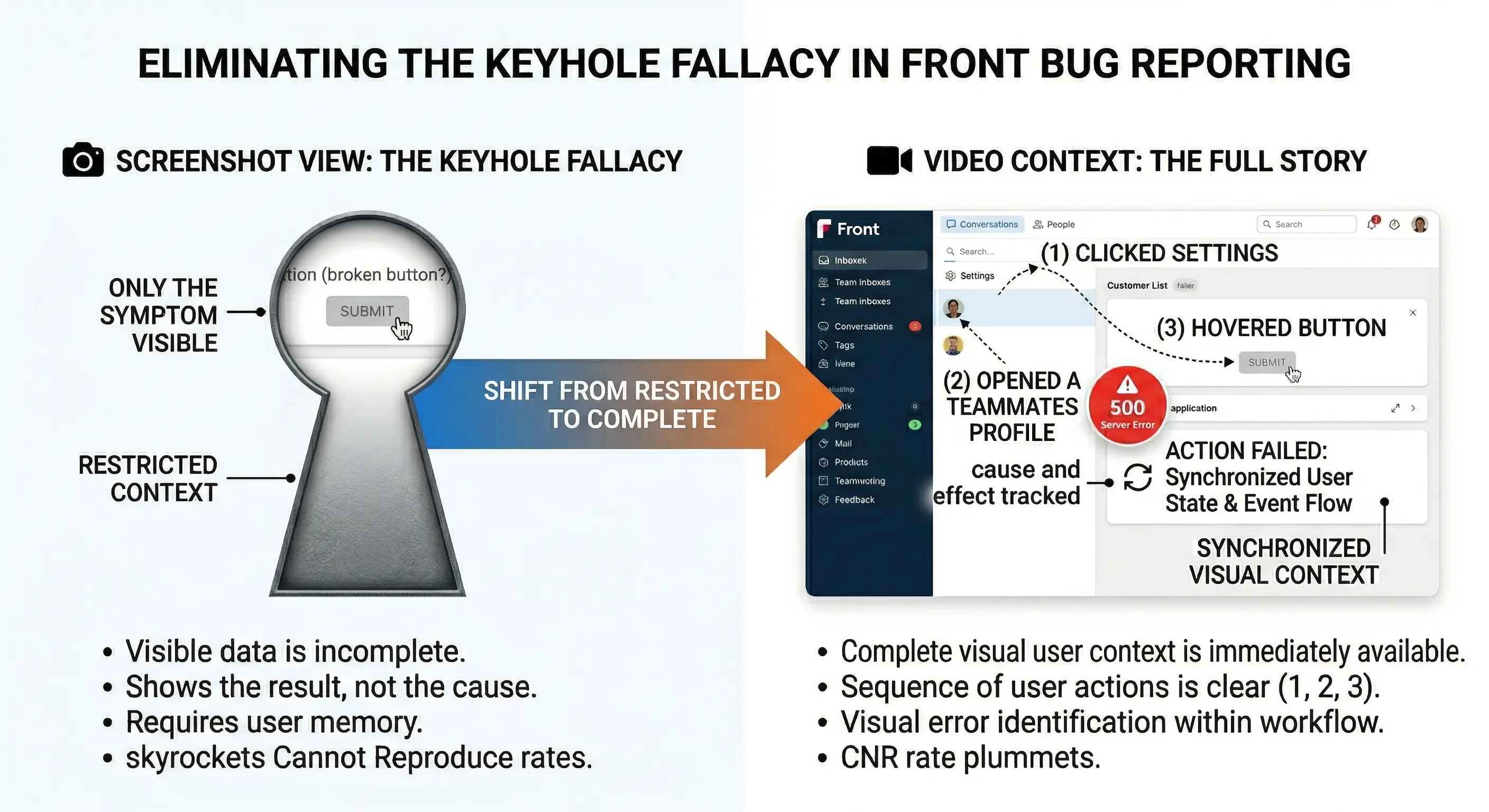
Let’s break down the critical data points that the keyhole view completely obscures:
1. The Missing Context (The Before and After)
A customer emails a screenshot showing a modal window stuck open. The image doesn’t reveal that the user rapidly double-clicked the trigger button while the page was loading, causing a JavaScript race condition. Because the agent only sees the final stuck state through the keyhole, they will test the feature with a normal, single click, find no issue, and close the ticket as “Cannot Reproduce.”
2. The Silent Network Failures (The Invisible Strings)
A screenshot shows an empty customer data table. The support agent might assume the customer simply hasn’t added any data yet. In reality, a background API call intended to fetch that data failed with a 500 Internal Server Error. This failure is quietly logged in the browser’s Network tab—far outside the boundaries of the cropped screenshot.
3. The Hidden Console Clues (The Warning Lights)
Modern SaaS applications output dozens of diagnostic logs into the browser console. The critical clue to solving a bug is often a specific variable mismatch hidden “under the hood” of the webpage. By relying on static images, you are effectively forcing your non-technical customers to act as QA engineers, expecting them to know how to open Chrome Developer Tools and capture technical logs.
The Operational Cost: Breaking the Internal Handoff
The reliance on insufficient static evidence doesn’t just frustrate your users; it acts as massive operational drag that slows down your entire organization, specifically during the internal escalation process.
The true power of Front lies in its collaboration tools. When a Tier 1 agent cannot solve a technical issue, they can simply @mention a Tier 2 specialist or an engineer directly in the comment section of the customer’s email.
“@dev-team, customer is reporting the export is broken. Attached is their screenshot. Any ideas?”
Engineers operate on reproduction steps. When an engineer reviews a customer thread in Front and is forced to look through the “keyhole” of a cropped screenshot, they reject the escalation. They ask the agent to go back to the customer and get console logs, browser versions, and exact click paths.
The “Evidence Gap” Workflow Failure
This flowchart illustrates how static evidence creates a hard barrier between your front-line support and your backend engineering team, forcing a looping workflow that drains company resources.
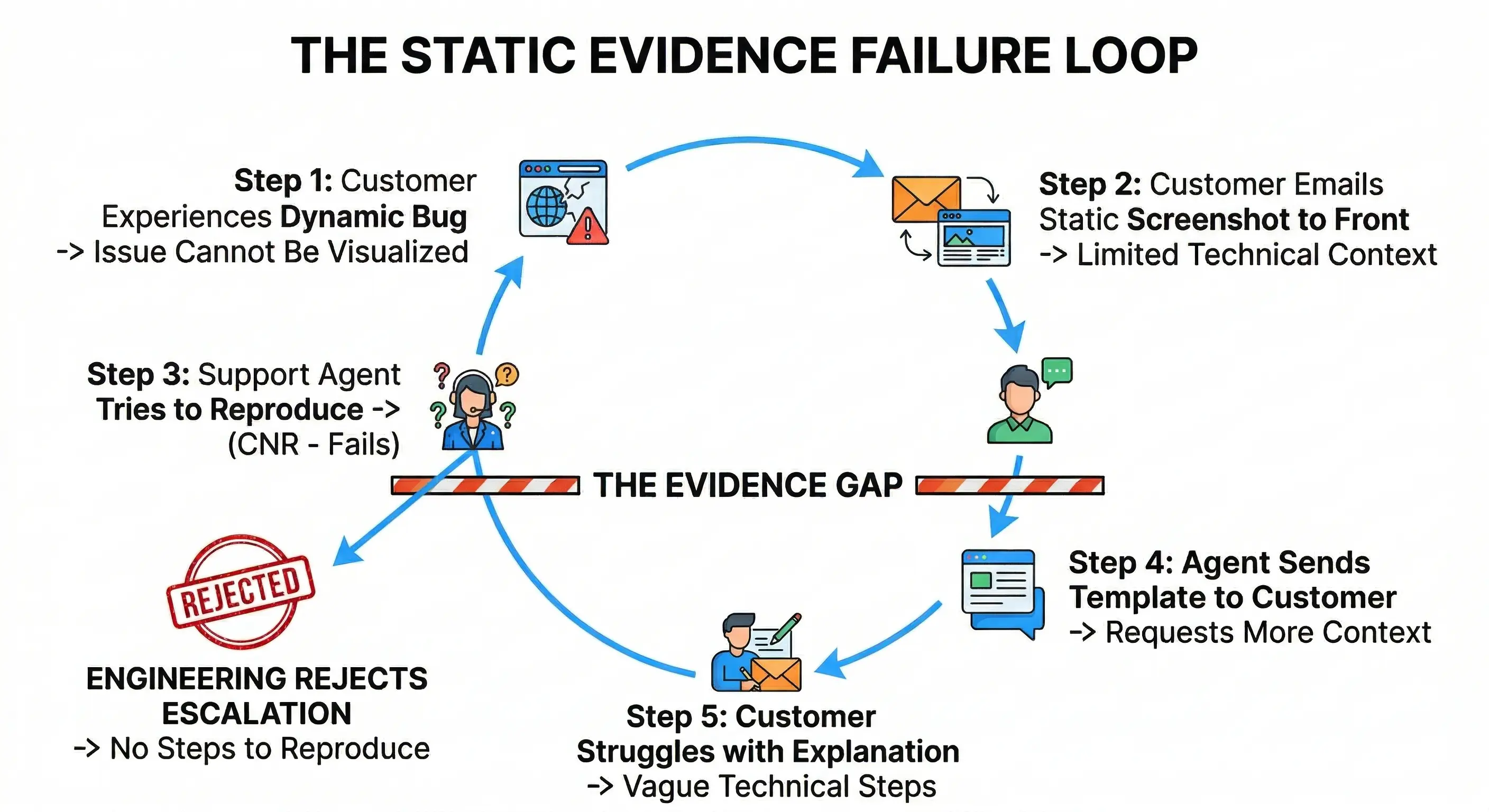
Every single loop in this process costs real money in wasted agent hours. Furthermore, because this is happening via email, each loop might add an entire day to the resolution time. Your Time to Resolution (TTR) spikes, and Customer Satisfaction (CSAT) scores take a massive hit.
The Paradigm Shift: Asynchronous Video Evidence
If the fundamental problem is that screenshots only capture “nouns” (static states), the logical solution is to utilize a medium that captures “verbs” (actions, processes, and sequences).
Asynchronous video is the perfect antidote to the limitations of email and static imagery. When a customer provides a video recording of their issue, the entire dynamic of the Front inbox changes:
- Objective Reality: There is no relying on the customer’s memory of what they clicked. The video shows the exact sequence of mouse movements, inputs, and the UI’s reaction.
- Instant Empathy: Hearing a customer narrate their issue while showing it on screen builds immediate empathy.
- The Perfect Handoff: When an agent
@mentionsan engineer in Front and points them to a video, the engineer gets exactly what they crave: a flawless, visual reproduction of the bug in its natural environment.
The Problem with Traditional Video Attachments in Email
If video is so powerful, why don’t customers just attach screen recordings to their emails?
Friction and File Limits. Traditional screen recording requires the user to have software installed. Once recorded, a 60-second high-resolution .mov file can easily exceed 50MB. Standard email servers generally reject attachments larger than 20MB to 25MB. If a customer spends 5 minutes recording a detailed bug report only to have the email bounce back because the file is too large, you have created a severely negative touchpoint.
Zero-Friction Evidence with ScreenReply
To make video the default standard in your Front shared inbox, the capture process for the customer must be radically simple. It cannot involve downloads, extensions, or email attachment limits.
This is exactly why we built the ScreenReply integration for modern support teams. ScreenReply removes the technical barriers of video capture, allowing your agents to gather high-fidelity visual evidence directly through their standard Front workflows.
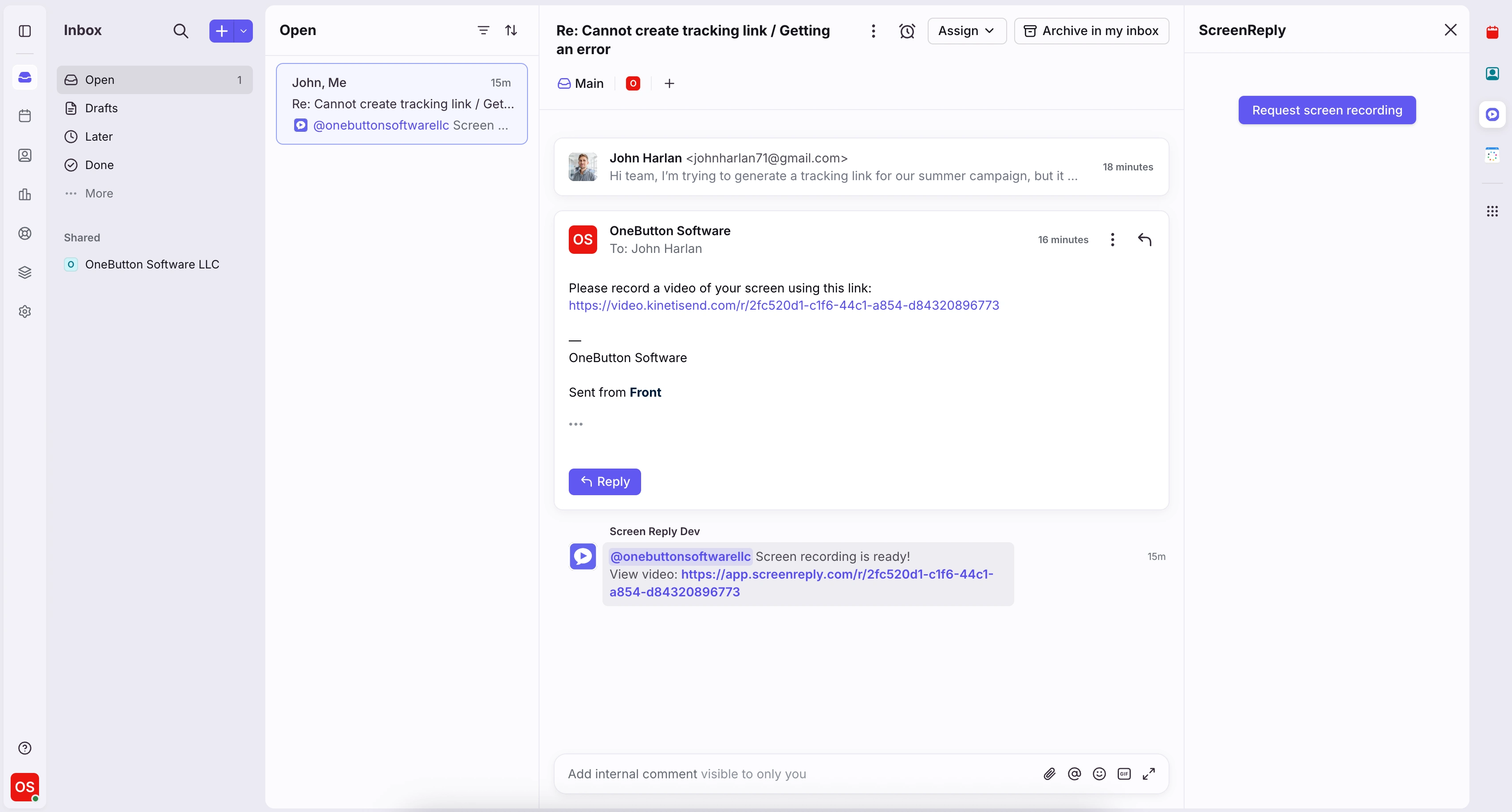
Step 1: Generate a Request Without Leaving Front
When an agent receives a confusing bug report, the workflow shouldn’t involve jumping between tabs to create links. With the integration, the agent opens the Front composer, clicks the ScreenReply plugin in the sidebar, and instantly generates a unique “Request Recording” link. This link is dropped directly into the email draft, keeping the agent entirely within their Front workspace.
Step 2: Frictionless, Zero-Install Capture for the User
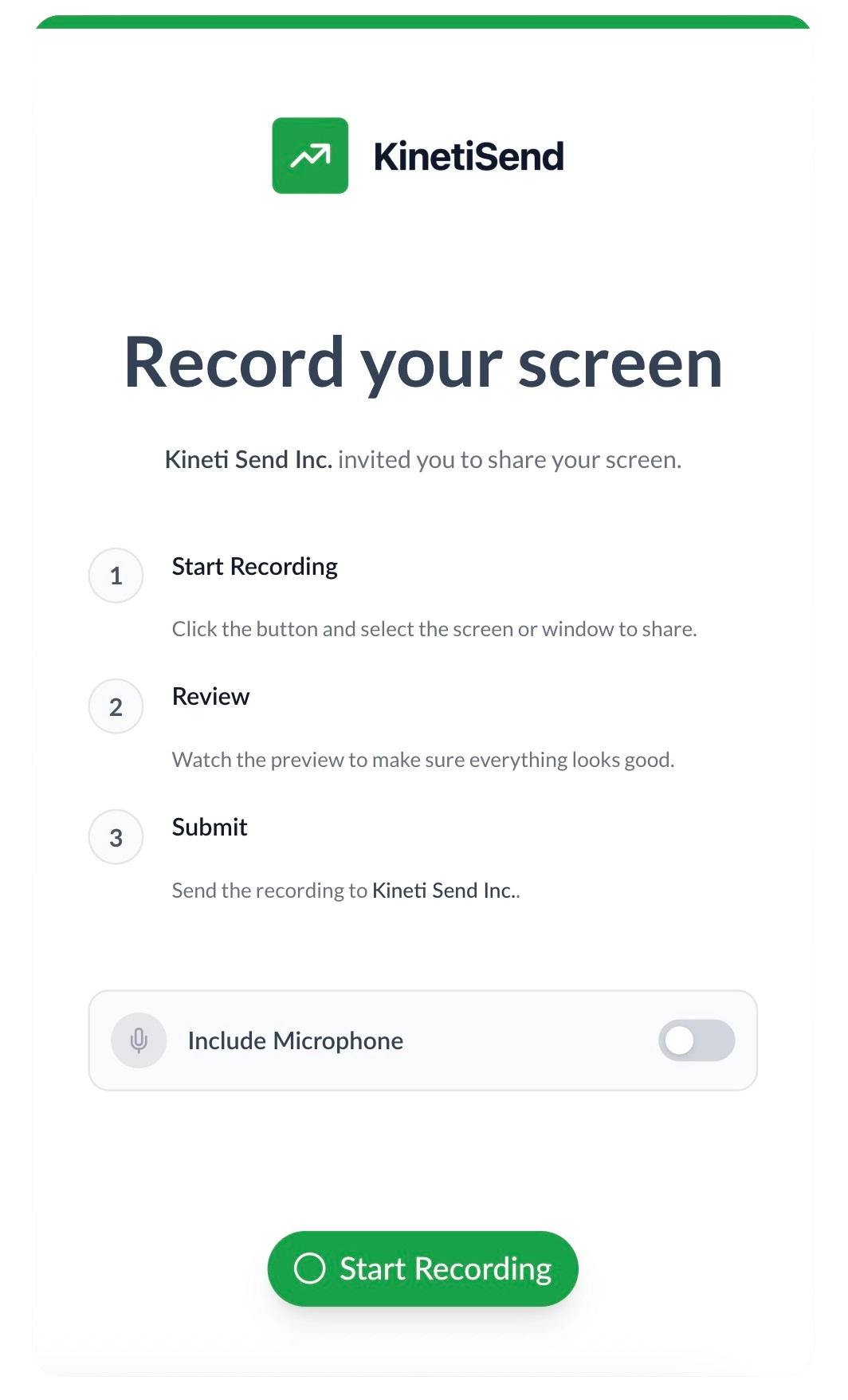
The biggest hurdle in video support is customer effort. ScreenReply solves this. When the customer clicks the link in your email, they are directed to a clean, secure webpage. Utilizing native browser technology, they do not need to install any software, download extensions, or create an account. They simply click record, select the tab causing the issue, narrate the problem, and hit stop. It is the ultimate low-friction experience.
Step 3: Instant Playback & Engineering Alignment
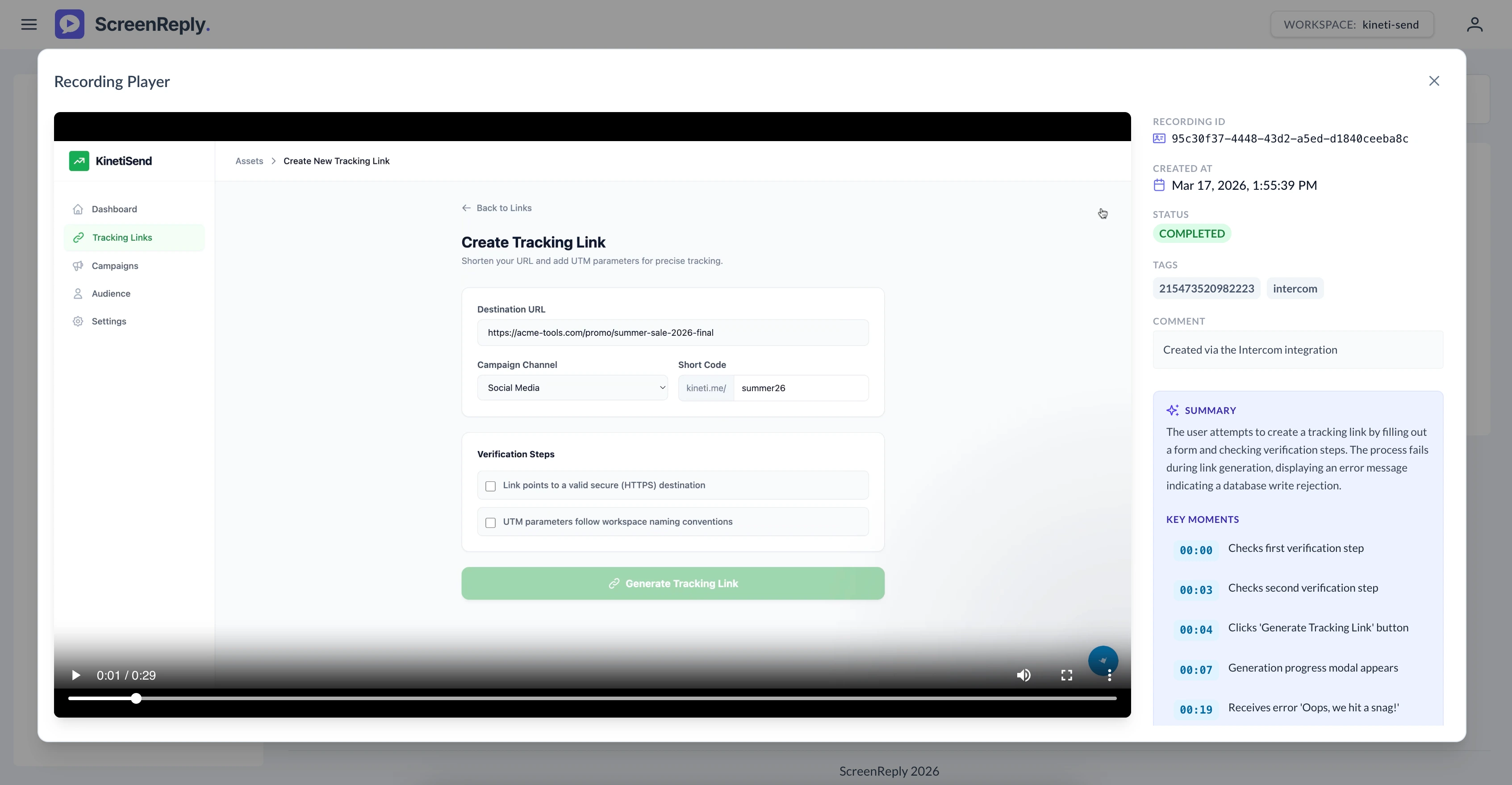
The moment the customer finishes recording, the video is processed instantly in the cloud, completely bypassing those strict email file size limits. The support agent (and any engineer they @mention in the internal Front thread) can click the resulting link to access the dedicated player. They can watch the high-fidelity playback, observe the exact sequence of events, and diagnose the root cause immediately—turning a multi-day investigation into a 10-minute resolution.
Comparison Matrix: The Support Evidence Spectrum
| Feature | Text Description via Email | Static Screenshot | Asynchronous Video (ScreenReply) |
|---|---|---|---|
| Captures the Final Symptom | Vague | High | High |
| Captures User Steps & Actions | Poor (Relies on memory) | None | Perfect (Visual confirmation) |
| Captures Temporal Sequence | None | None | High (Shows “before and after”) |
| Captures Dynamic UI States | None | Low (Frozen frame) | High (Shows transitions/loaders) |
| Bypasses Email Attachment Limits | N/A | Yes | Yes (Cloud-hosted link) |
| Customer Effort to Create | Medium | Low | Low (Zero-Install workflow) |
| Agent Reproduction Rate | Low (<20%) | Medium (~40%) | Very High (>95%) |
Action Plan: Building a Video-First Front Workspace
Transitioning away from screenshots isn’t just about adopting a new tool; it requires a shift in your team’s operational habits. Here is how you can practically implement a video-first workflow in Front today:
1. Rewrite Your Message Templates
Front’s Message Templates (canned responses) are the backbone of efficient replies. Audit your existing templates. Find any instance where your team asks: “Could you please send a screenshot?” Rewrite these to prioritize video evidence.
New Video-First Template:
“To ensure our engineering team can fix this for you as quickly as possible, it would be incredibly helpful to see exactly what is happening on your end. Could you please click the link below to record a quick 30-second video of the issue? (It runs entirely in your browser, no software installation required!)“
2. Train the Team on the “Keyhole Fallacy”
Educate your support staff on the concept of the Keyhole Fallacy. When they understand how much context they are missing with cropped, static images, they will naturally default to requesting video evidence to make their own lives easier before escalating to engineers.
Conclusion
In a platform as collaborative and fast-paced as Front, relying on static screenshots is an anchor slowing down your entire operation. Screenshots breed ambiguity, force unnecessary asynchronous communication, and create a frustrating divide between what the customer experiences and what your engineering team can actually fix.
By shifting your standard operating procedure from requesting static images to requesting zero-friction video via ScreenReply, you aren’t just adopting a new feature. You are fundamentally optimizing your Time to Resolution, respecting your customers’ time, and empowering your engineers to do what they do best: fix the software.
Stop letting complex bugs get lost in translation in your shared inbox.
Ready to eliminate the “Cannot Reproduce” bottleneck in Front? Equip your support team with the fastest, easiest way to gather dynamic video evidence from customers, entirely friction-free.
👉 Install the integration and start using ScreenReply today at screenreply.com.
Frequently Asked Questions (FAQ)
Why is relying on email attachments like screenshots bad for bug reporting in Front? Email is inherently asynchronous, meaning replies can take hours. If a customer attaches a static screenshot lacking vital technical context, the resulting back-and-forth dramatically inflates your Time to Resolution (TTR) and risks breaching SLAs.
How does video evidence improve the internal handoff in Front? Front excels at internal collaboration via @mentions. When a support agent tags an engineer with a video recording of a bug rather than a vague screenshot, the engineer gets instant visual reproduction, eliminating the need for them to ask clarifying questions in the internal comments.
Can’t customers just attach their own screen recordings to Front emails? They can, but traditional screen recording introduces immense friction. Customers have to install software, record, and deal with massive file sizes that often exceed standard email attachment limits, causing the email to bounce.
How does the ScreenReply integration work within the Front composer? Support agents simply use the ScreenReply plugin directly within the Front message composer to generate a secure, one-click recording link. They drop this link into their reply template, keeping the workflow entirely within Front.
Do customers need to install an app to use the ScreenReply link sent via Front? No. ScreenReply utilizes a zero-install architecture. When the customer clicks the link in your email, they can instantly record their screen, browser tab, or application using native browser technologies, removing all friction.