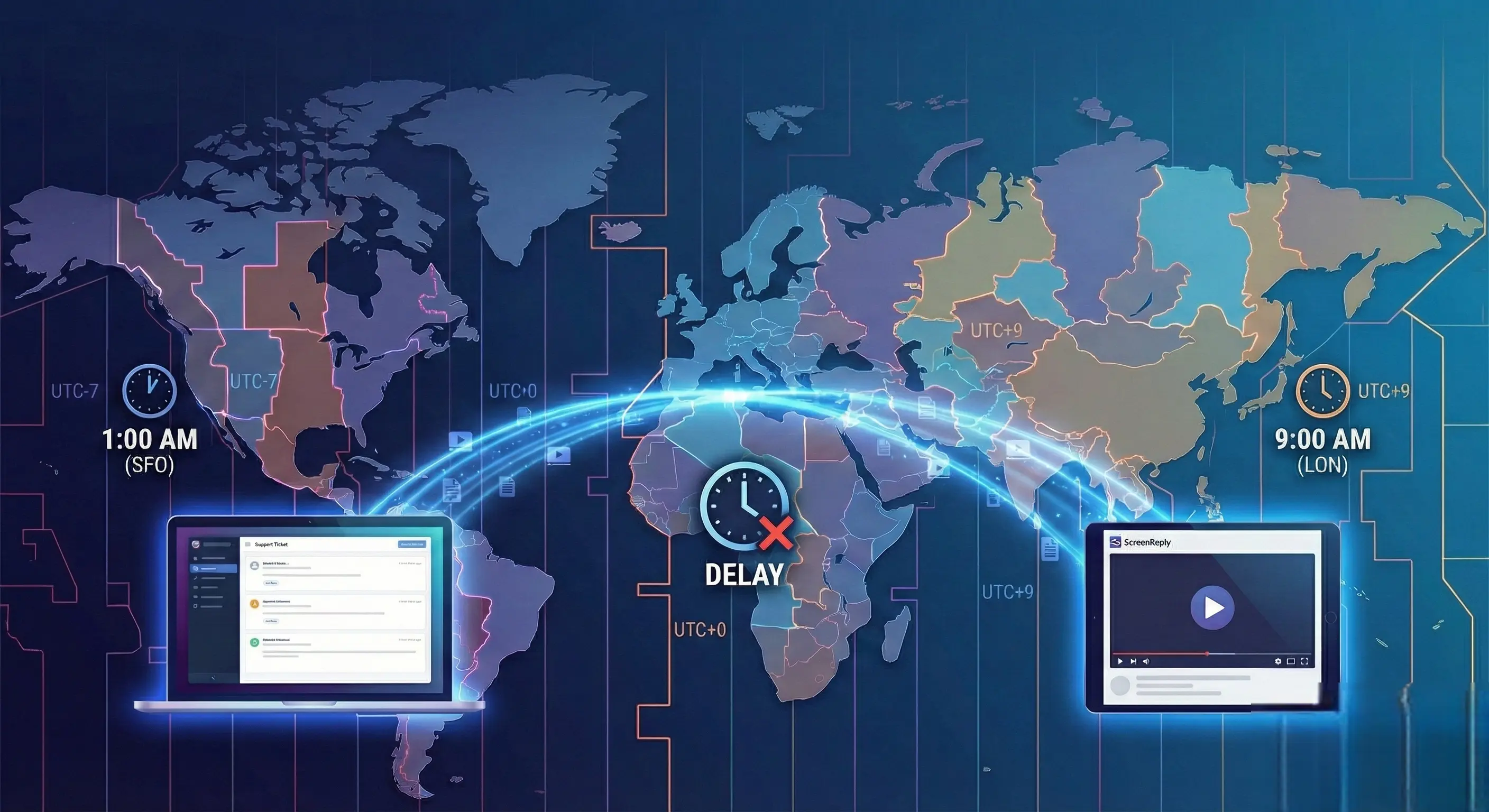
Crossing the Timezone Gap: Best Practices for Async Troubleshooting in Global SaaS
Thu Jan 22 2026
Introduction
It’s 9:00 AM in London. Your Head of Customer Success just opened their laptop to an inbox full of urgent tickets from enterprise clients in San Francisco and Sydney.
The clients sent these responses seven hours ago, just as your London team was going to sleep.
You open the first ticket. The client wrote: “The workaround you sent didn’t fix the integration error. What next?”
Now begins the painful calculation. To get more context, you need to ask a clarifying question. You send the email. The client in San Francisco won’t see it for another five hours. By the time they reply, your London agent will be at the pub.
This is the “Timezone Tax” on SaaS growth.
As your company expands globally, the “we’ll just jump on a Zoom call” approach to troubleshooting stops working. When your customer’s working day ends just as yours begins, real-time collaboration isn’t a service standard—it’s a logistical impossibility that leads to delayed resolutions, frustrated customers, and burned-out support agents working graveyard shifts.
To scale global support effectively, you must master the art of Asynchronous Troubleshooting.
In this guide, we will explore why synchronous habits destroy cross-timezone relationships, the best practices for shifting to an async-first mindset, and how leveraging visual evidence breaks the cycle of delayed support.
Section 1: The Failure of Synchronous Support at Scale
In the early days of a B2B SaaS company, high-touch, synchronous support is a differentiator. Jumping on a call to fix an issue feels premium.
But as you acquire customers in APAC, EMEA, and the Americas, this model collapses under its own weight. The fundamental problem isn’t technical; it’s temporal.
When a complex technical issue arises across a 12-hour time difference, you are forced into two bad options:
- The Scheduling Stalemate: Trying to find a 30-minute window that works for an engineer in Berlin and a customer in Los Angeles. The result is often a meeting scheduled three days in the future, leaving the customer blocked in the meantime.
- The Graveyard Shift: Forcing your support team to work unsociable hours to accommodate client timezones. This leads to high attrition rates, poor morale, and a lower quality of support due to fatigue.
The “Ping-Pong” Delay Multiplier
If you abandon live calls and rely solely on text-based email (the default asynchronous method), you encounter a different problem.
Text is a low-bandwidth medium. It struggles to convey complex technical context. When an agent in one timezone misunderstands a text description from a customer in another, they have to ask a clarifying question.
In a same-timezone scenario, that clarification might take an hour. In a cross-timezone scenario, it takes 24 hours.
Every exchange of “Can you clarify what you mean?” adds a full business day to the resolution time. A simple three-email exchange turns a minor bug into a four-day ordeal.
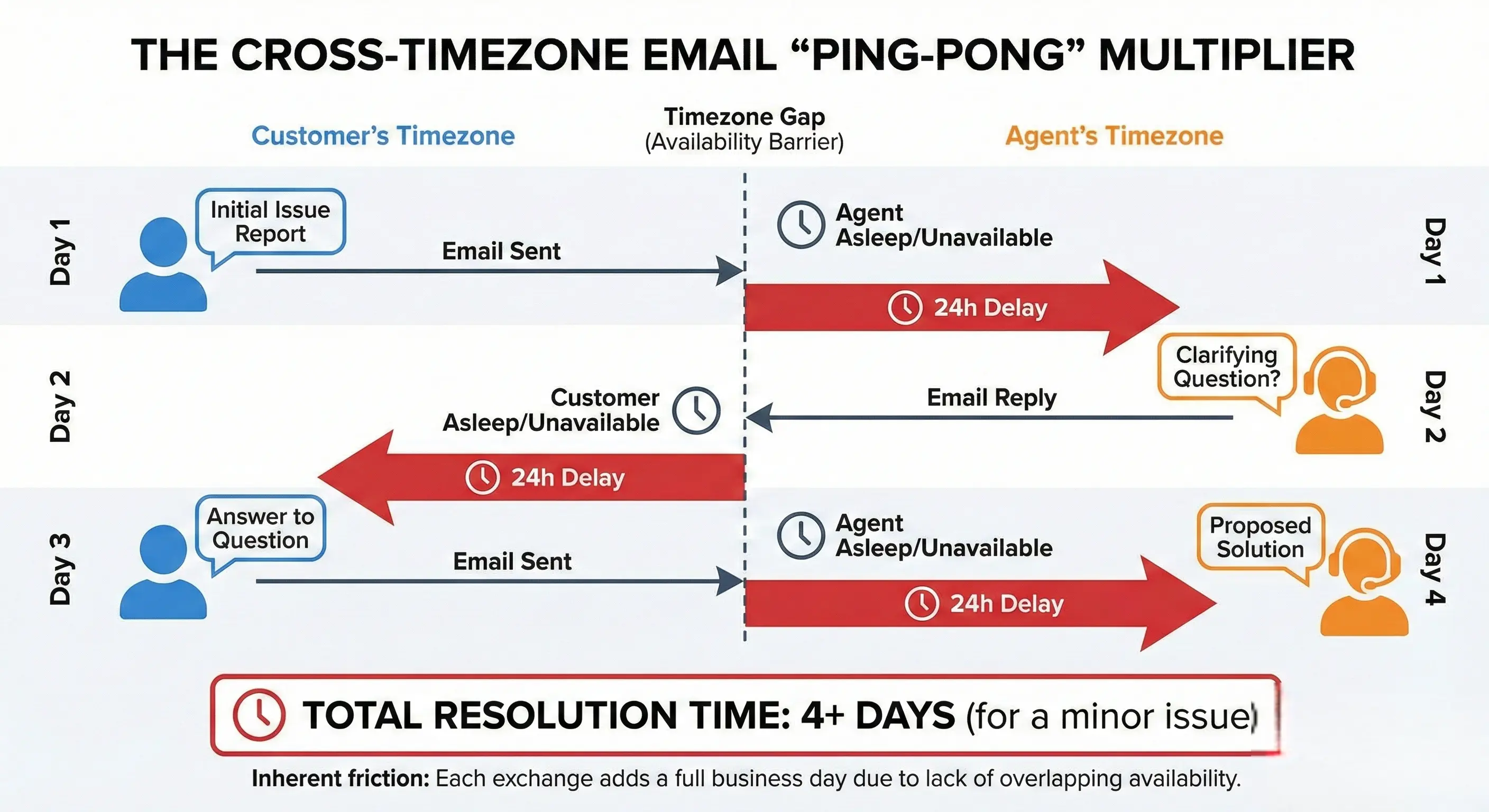
This diagram visualizes the inherent friction of cross-timezone support. The gap isn’t just distance; it’s availability. Bridging this gap requires more than just email—it requires a fundamentally different approach to context gathering.
Section 2: Pillars of Effective Async Troubleshooting
Mastering asynchronous support doesn’t mean sacrificing quality or human connection. It means front-loading context and optimizing your workflow for hand-offs rather than real-time conversation.
Here are the essential best practices for global support teams.
1. The Doctrine of Over-Communication
In a synchronous call, you can interrupt and ask for clarification instantly. In async, you only get one shot per 24-hour cycle. Therefore, brevity is not a virtue.
Support agents must be trained to over-communicate.
- Never assume context: Don’t just say “click the button.” Say “Click the blue ‘Save’ button in the top right header of the dashboard.”
- Anticipate the next question: If you provide a fix, also provide the next step if that fix fails. “Try step A. If you still see error X, please gather these logs and try step B.” This prevents an entire day of delay if the first suggestion doesn’t work.
2. Structured Hand-Offs and Documentation
If you are large enough to operate a “Follow-the-Sun” model (where tickets are handed from APAC to EMEA to AMER teams as the day progresses), documentation becomes your lifeblood.
A ticket passed from Sydney to London without rigorous internal notes is a grenade. The London agent has to start from scratch, often asking the customer questions they’ve already answered.
Best Practice: Implement a standardized “Hand-Off Protocol” in your ticketing system (Zendesk, Jira, etc.). Before ending a shift, an agent must summarize:
- The current hypothesis of the root cause.
- Actions already taken (and their results).
- The exact next steps required by the incoming agent.
3. Shift Left on Context Gathering
The biggest enemy of async troubleshooting is ambiguity. If a customer in Tokyo submits a ticket saying “The data import failed” and then goes to sleep, the support team in New York is paralyzed. They cannot troubleshoot.
You must shift context gathering to the very beginning of the interaction.
Don’t let customers submit vague tickets. Update your support forms to require critical information upfront—browser type, user IDs, timestamps, and specific error messages. The goal is to ensure that when an agent wakes up and sees a ticket, they have 80% of what they need to start investigating immediately.
Section 3: The Visual Breakthrough in Async Support
While over-communication and better forms help, text remains an imperfect medium for troubleshooting software.
Describing a dynamic UI glitch or a complex workflow in writing is cognitively demanding for the customer and prone to misinterpretation by the agent.
This is where Asynchronous Visual Support becomes the game-changer for cross-timezone relationships. It bridges the gap between the richness of a Zoom call and the convenience of email.
Replacing 1,000 Words with 60 Seconds of Video
Instead of asking a customer to type out a reproduction path, or trying to schedule a live call at 3 AM, ask them to record a quick video of the issue.
When an agent in a different timezone receives a video, the dynamic changes completely.
- No Ambiguity: They see exactly what the customer sees. The mouse movements, the loading spinners, the console errors, and the surrounding environment.
- Zero “Ping-Pong”: The need for clarifying questions (“Did you mean the left sidebar or the right?”) evaporates.
- Human Connection: A video, even a screen recording with voiceover, feels far more personal and attentive than a cold text email.
The “Async-First” Workflow Example
Let’s revisit our initial scenario with visual support applied.
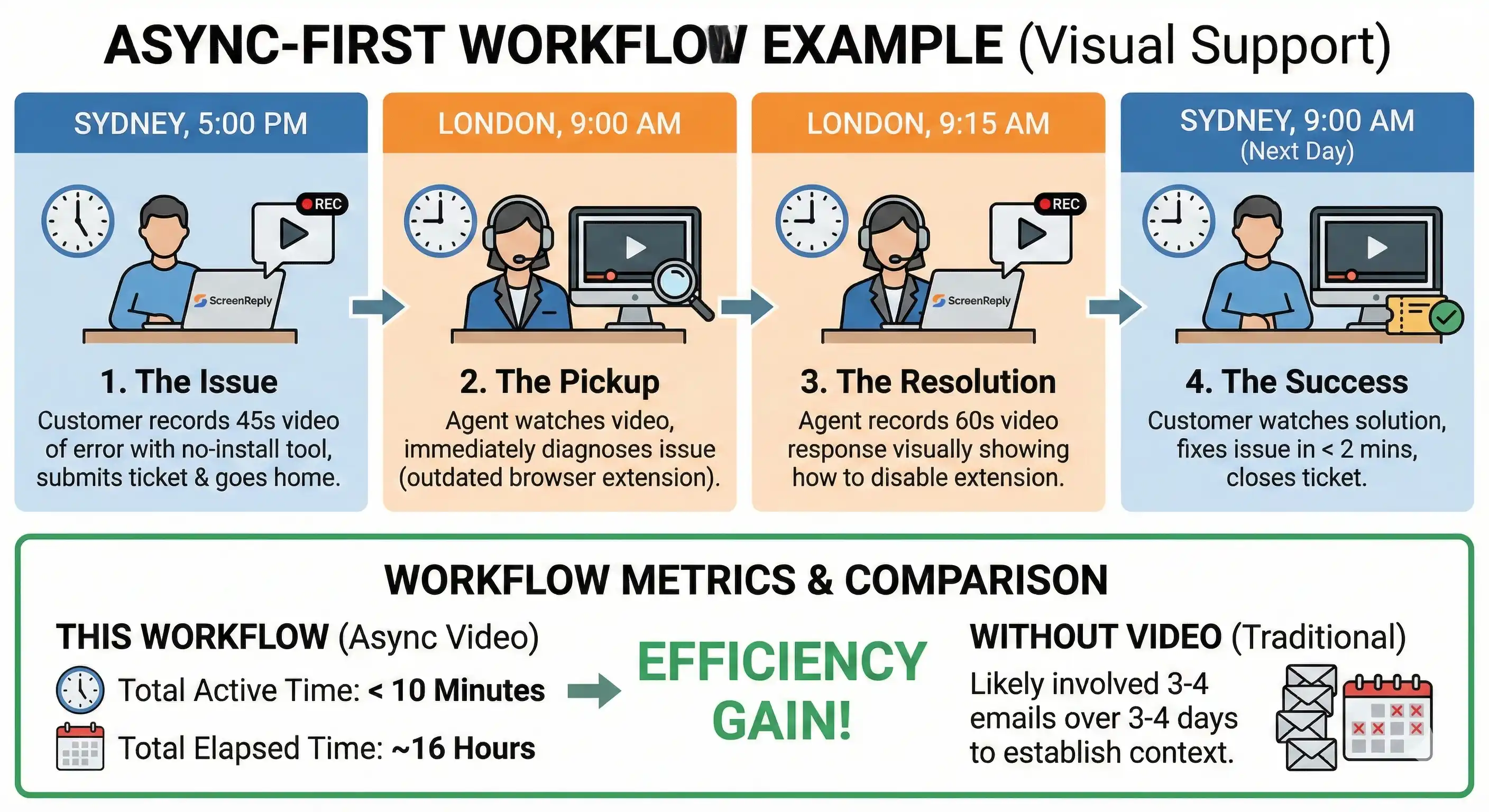
- The Issue (Sydney, 5:00 PM): A customer encounters a critical reporting error. Instead of typing a vague email, they use a no-install tool like ScreenReply to record 45 seconds of their screen showing the error in action. They submit the ticket and go home.
- The Pickup (London, 9:00 AM): The London agent opens the ticket. They don’t need to ask “what happened?” They watch the video. They immediately see the customer is using an outdated browser extension causing the conflict.
- The Resolution (London, 9:15 AM): The agent records a 60-second video response using ScreenReply, visually showing the customer how to disable the extension and successfully run the report.
- The Success (Sydney, 9:00 AM next day): The customer arrives at work, watches the solution video, fixes the issue in under 2 minutes, and closes the ticket.
Total time spent actively working on the ticket: < 10 minutes. Total elapsed time: ~16 hours.
Without video, this exchange would likely have involved 3-4 emails over 3-4 days to establish the same context.
Section 4: Implementing the Right Tooling
To make asynchronous troubleshooting work, you need to remove friction. If asking a customer to provide visual context requires them to download software, install extensions, or manage large video files, they won’t do it. They will revert to vague text.
This is the specific challenge we addressed with ScreenReply.
For cross-timezone support to be effective, the tooling must be effortless for both the sender (customer) and receiver (agent).
The Requirement for No-Install Tools
In a B2B environment, corporate firewalls and IT policies often prevent users from installing new software. An async video tool must be entirely browser-based.
ScreenReply allows agents to generate a unique recording link and send it to the customer in any timezone. The customer clicks the link, records their screen immediately without installing anything, and the video is instantly available to the agent.
Comparison: Support Modalities Across Timezones
The table below summarizes why visual asynchronous support is the optimal model for global SaaS teams.
| Feature | Synchronous (Zoom/Phone) | Basic Async (Email/Text) | Visual Async (ScreenReply) |
|---|---|---|---|
| Context Richness | High | Low | High |
| Scheduling Required | Yes (Painful) | No | No |
| Timezone Friction | Extreme | Moderate (High delay) | Low |
| Agent Burnout Risk | High (Odd hours) | Moderate (Repetition) | Low |
| Speed to Resolution | Slow (Due to scheduling) | Slow (Due to ping-pong) | Fast |
Conclusion
Geographic expansion should be a cause for celebration, not operational panic.
The “Timezone Tax” is only payable if you insist on using outdated, synchronous support models in a 24/7 global economy. Trying to force real-time interactions across vast distances fails your customers, who have to wait, and fails your agents, who have to work unhealthy hours.
By embracing asynchronous best practices—over-communicating, documenting rigorously, and most importantly, shifting to visual evidence—you can turn timezone differences from a liability into an asset. You can offer “follow-the-sun” speeds without the “follow-the-sun” headcount.
Stop asking your customers to describe what they see. Start asking them to show you.
Ready to close the timezone gap in your support team? Equip your agents with the fastest way to gather asynchronous visual context. 👉 Start using screenreply.com today.